
Powered by Swiftproxy — Fast, reliable proxies with free trial & non-expiring traffic.
Use code PROXY90 for 10% off!

Supported by IPRoyal — Proxy services for OSINT and security research.









Metadata extraction and web scraping for OSINT and pentesting.
MetaDetective is a single-file Python 3 tool for metadata extraction and web scraping, built for OSINT and pentesting workflows.
It has no Python dependencies beyond exiftool. One curl and you're operational.
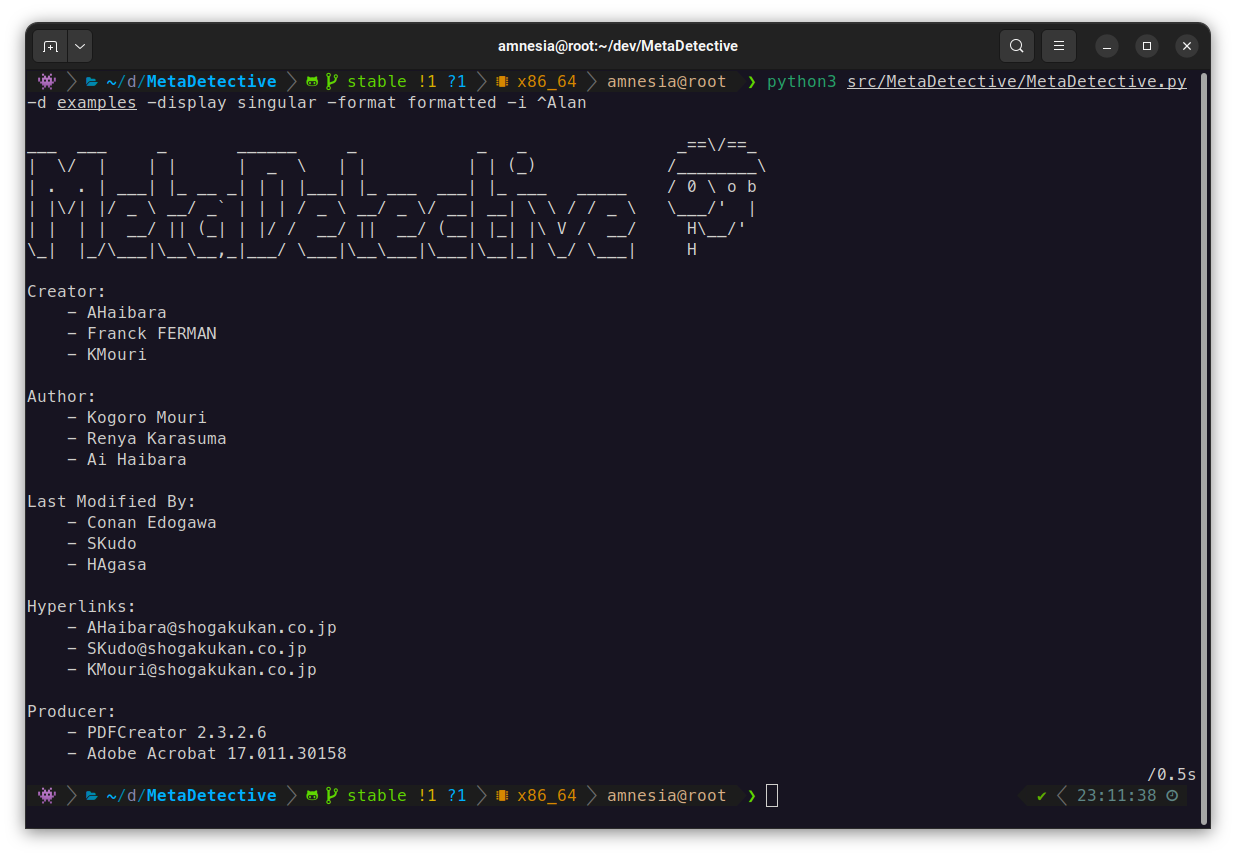
What it extracts: authors, software versions, GPS coordinates, creation/modification dates, internal hostnames, serial numbers, hyperlinks, camera models - across documents, images, and email files.
What it does beyond extraction:
- Direct web scraping of target sites (no search engine dependency, no IP blocks)
- GPS reverse geocoding with OpenStreetMap (opt-out with
--no-geocode), map link generation - Export to HTML, TXT, or JSON
- Selective field extraction with
--parse-only - Deduplication across multiple files
It was built as a replacement for Metagoofil, which dropped native metadata analysis and relied on Google search (rate limiting, CAPTCHAs, proxy overhead).
Requirements: Python 3, exiftool.
# Debian / Ubuntu / Kali
sudo apt install libimage-exiftool-perl

# Arch
sudo pacman -S perl-image-exiftool

# Gentoo
sudo emerge -av media-libs/exiftool

# macOS
brew install exiftool

# Windows
winget install OliverBetz.ExifToolcurl -O https://raw.githubusercontent.com/franckferman/MetaDetective/stable/src/MetaDetective/MetaDetective.py
python3 MetaDetective.py -hpip install MetaDetective
metadetective -hgit clone https://github.com/franckferman/MetaDetective.git
cd MetaDetective
python3 src/MetaDetective/MetaDetective.py -hdocker pull franckferman/metadetective
docker run --rm franckferman/metadetective -h
# Mount a local directory
docker run --rm -v $(pwd)/loot:/data franckferman/metadetective -d /dataMetaDetective auto-detects a positional argument: a path runs analysis, an http(s):// URL runs scraping. The classic -d / -s -u flags still work exactly as before.
# Analyze a directory
python3 MetaDetective.py ./loot/

# Analyze a single file
python3 MetaDetective.py report.pdf

# Scrape a website (preview only)
python3 MetaDetective.py https://target.com/ --scan

# Scrape and download (defaults to ./loot/ and --depth 1)
python3 MetaDetective.py https://target.com/
Safeguards are preserved: a path never triggers web scraping, and a URL rejects analysis-only flags.
# Analyze a directory (deduplicated singular view by default)
python3 MetaDetective.py -d ./loot/

# Specific file types, filter noise
python3 MetaDetective.py -d ./loot/ -t pdf docx -i admin anonymous

# Per-file display
python3 MetaDetective.py -d ./loot/ --display all

# Formatted output (singular/default display)
python3 MetaDetective.py -d ./loot/ --format formatted

# Single file
python3 MetaDetective.py -f report.pdf

# Multiple files
python3 MetaDetective.py -f report.pdf photo.heic# Quick stats: identities, emails, GPS exposure, tools, date range
python3 MetaDetective.py -d ./loot/ --summary
# Chronological view of document creation/modification
python3 MetaDetective.py -d ./loot/ --timeline
# Both together
python3 MetaDetective.py -d ./loot/ --summary --timeline
# Scripting: no banner, summary only
python3 MetaDetective.py -d ./loot/ --summary --no-banner--parse-only limits extraction to specific fields. Useful to cut noise or target a specific data point.
# Extract only Author and Creator fields
python3 MetaDetective.py -d ./loot/ --parse-only Author Creator

# Extract GPS data only from iPhone photos
python3 MetaDetective.py -d ./photos/ -t heic heif --parse-only 'GPS Position' 'Map Link'# HTML report (default)
python3 MetaDetective.py -d ./loot/ -e
# TXT
python3 MetaDetective.py -d ./loot/ -e txt
# JSON - singular (deduplicated values per field)
python3 MetaDetective.py -d ./loot/ -e json
# JSON - per file
python3 MetaDetective.py -d ./loot/ --display all -e json
# Custom filename suffix and output directory
python3 MetaDetective.py -d ./loot/ -e json -c pentest-corp -o ~/results/JSON singular output structure:
{
  "tool": "MetaDetective",
  "generated": "2026-03-21T...",
  "unique": {
    "Author": ["Alice Martin", "Bob Dupont"],
    "Creator Tool": ["Microsoft Word 16.0"]
  }
}
Pivot with jq:
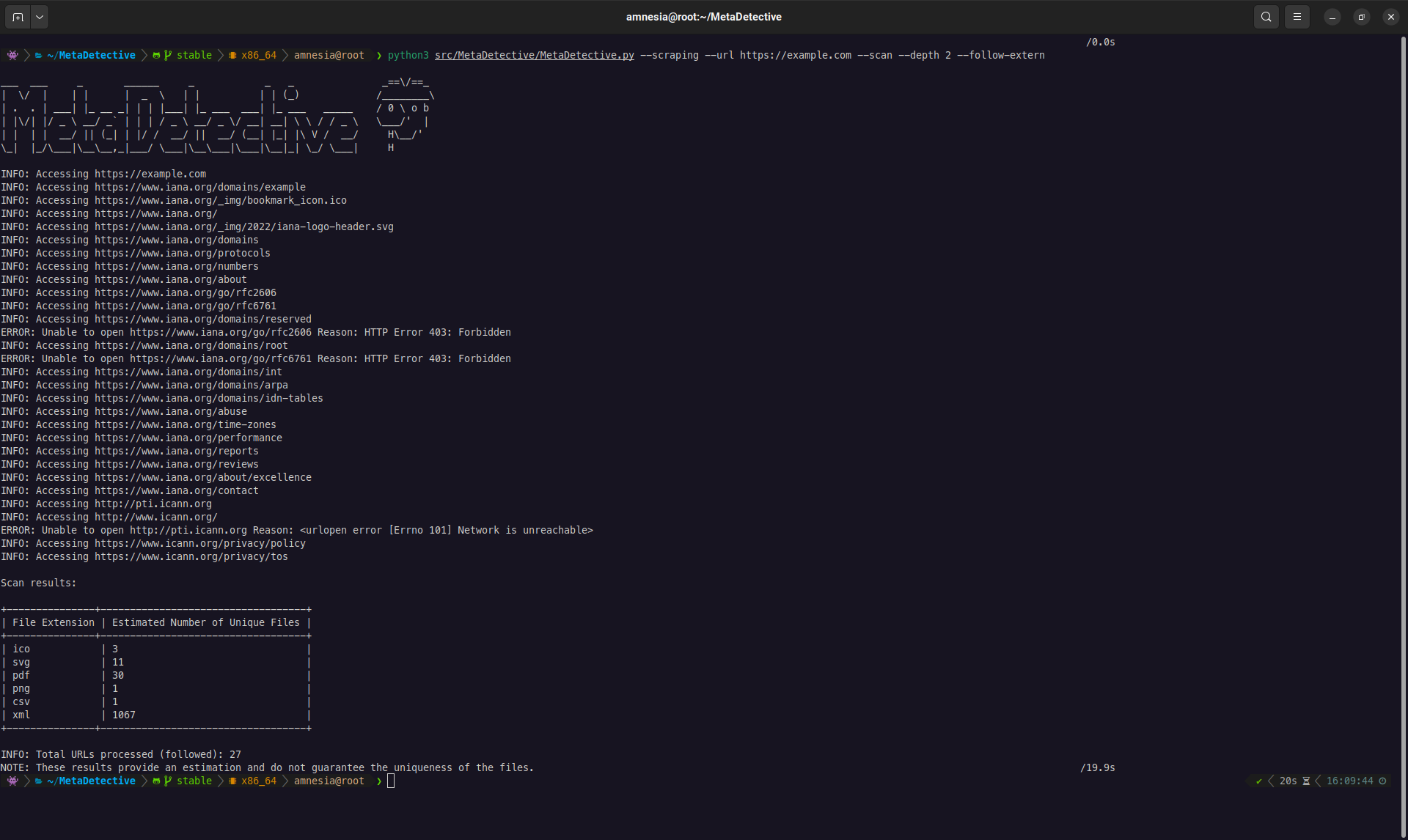
jq '.unique.Author' MetaDetective_Export-*.jsonMetaDetective can crawl a target website, discover downloadable files (PDF, DOCX, XLSX, images, etc.), and download them for local metadata analysis.
Two scraping modes:
--download-dir- Download files to a local directory for analysis. This is the primary mode.--scan- Preview only: list discovered files and stats without downloading. Useful for scoping before a full download.
--scanand--download-dirare mutually exclusive. If neither is given, MetaDetective defaults to download mode into./loot/(created if missing).
The --depth flag controls crawl breadth. The default is 1: MetaDetective looks at the target URL and the pages linked from it, which covers most site structures. Use 0 to restrict to the single target page, or 2+ for deeper crawls.
| Depth | Behavior |
|---|---|
0 |
Only the target URL. Finds files directly linked on that single page. |
1 (default) |
Target URL + all pages linked from it. Covers most site structures. |
2+ |
Follows links N levels deep. Broader coverage, more requests, slower. |
Download (primary workflow):
# Standard download with depth 1 (recommended starting point)
python3 MetaDetective.py --scraping --url https://target.com/ \
  --download-dir ~/loot/ --depth 1

# Target specific file types
python3 MetaDetective.py --scraping --url https://target.com/ \
  --download-dir ~/loot/ --depth 2 --extensions pdf docx xlsx pptx

# Parallel download (8 threads, 10 req/s)
python3 MetaDetective.py --scraping --url https://target.com/ \
  --download-dir ~/loot/ --depth 2 --threads 8 --rate 10

# Follow external links (CDN, subdomain, partner sites)
python3 MetaDetective.py --scraping --url https://target.com/ \
  --download-dir ~/loot/ --depth 1 --follow-extern

# Stealth: realistic User-Agent + low rate
python3 MetaDetective.py --scraping --url https://target.com/ \
  --download-dir ~/loot/ --depth 2 --user-agent stealth --rate 2
Scan (preview):
# Quick preview: how many files are reachable?
python3 MetaDetective.py --scraping --scan --url https://target.com/ --depth 1

# Filter preview by extension
python3 MetaDetective.py --scraping --scan --url https://target.com/ \
  --depth 2 --extensions pdf docx
Full pipeline (scrape + analyze + export):
# Step 1: download files
python3 MetaDetective.py --scraping --url https://target.com/ \
  --download-dir ~/loot/ --depth 2 --extensions pdf docx xlsx

# Step 2: analyze and export
python3 MetaDetective.py -d ~/loot/ -e html -o ~/results/| Flag | Default | Description |
|---|---|---|
--url |
required | Target URL |
--download-dir |
./loot/ |
Download destination (created if missing). Used by default when neither --scan nor --download-dir is set. |
--scan |
- | Preview mode (no download) |
--depth |
1 |
Link depth to follow. Use 0 for the single page, 2+ for deeper crawls. |
--extensions |
all supported | Filter by file type |
--threads |
4 |
Concurrent download threads (1-100) |
--rate |
5 |
Max requests per second (1-1000) |
--follow-extern |
off | Follow links to external domains |
--user-agent |
MetaDetective/<ver> |
Custom or preset UA string |
MetaDetective offers two display modes that control how results are structured:
--display singular (default) - Aggregates all unique values per field across every file. Best for OSINT: "who touched these documents?" at a glance.
# Default: deduplicated singular view
python3 MetaDetective.py -d ./loot/

# With formatted style (vertical list with markers)
python3 MetaDetective.py -d ./loot/ --format formatted

# With concise style (comma-separated on one line)
python3 MetaDetective.py -d ./loot/ --format concise
--display all - One block per file with its individual metadata. Best for forensic analysis: examine each document's properties independently.
python3 MetaDetective.py -d ./loot/ --display all
--formatonly works with--display singular. Using--formatwith--display allproduces an error.
Additional views:
| Flag | Description |
|---|---|
--summary |
Statistical overview: file count, unique identities, emails, GPS exposure, tools, date range |
--timeline |
Chronological view of document creation and modification events |
--no-banner |
Suppress the ASCII banner for scripting and pipeline use |
Three export formats are available. All respect the current --display mode.
# HTML report with dark theme, stats bar, and responsive layout
python3 MetaDetective.py -d ./loot/ -e html

# HTML per-file view
python3 MetaDetective.py -d ./loot/ --display all -e html

# Plain text
python3 MetaDetective.py -d ./loot/ -e txt

# JSON (structured, pipe into jq)
python3 MetaDetective.py -d ./loot/ -e json

# Custom output directory (created automatically if it does not exist)
python3 MetaDetective.py -d ./loot/ -e html -o ~/results/

# Custom filename suffix
python3 MetaDetective.py -d ./loot/ -e json -c pentest-corp -o ~/results/
The HTML export includes a summary header showing total files analyzed, total metadata fields extracted, and unique identities found (from Author, Creator, and Last Modified By fields).
All metadata values are HTML-escaped in the report. A document carrying crafted metadata (e.g. a malicious
Authorfield) cannot inject markup or scripts into the report you open in your browser.
When scraping, MetaDetective identifies itself as MetaDetective/<version> by default. Use --user-agent to change this:
# Use a preset
python3 MetaDetective.py --scraping --scan --url https://target.com/ --user-agent stealth

# Available presets
#   stealth, chrome-win, chrome-mac, chrome-linux,
#   firefox-win, firefox-mac, firefox-linux,
#   safari-mac, edge-win, android, iphone, googlebot

# Custom string
python3 MetaDetective.py --scraping --scan --url https://target.com/ \
--user-agent 'Mozilla/5.0 (compatible; MyScanner/1.0)'When a file exposes GPS coordinates, MetaDetective resolves them to a human-readable address via OpenStreetMap's Nominatim service. This sends the target's coordinates to a third party. Requests are rate-limited to 1/second (per Nominatim's usage policy) and cached.
# Opsec: disable geocoding entirely, show raw GPS only, no third-party request
python3 MetaDetective.py -d ./loot/ --no-geocode

# Query your own (self-hosted) Nominatim server instead of the public one
python3 MetaDetective.py -d ./loot/ --nominatim-url https://nominatim.example.com| Flag | Default | Description |
|---|---|---|
--no-geocode |
off (geocoding on) | Disable reverse geocoding; no coordinates leave your machine |
--nominatim-url |
public OSM server | Base URL of a Nominatim server to query |
| Flag | Description |
|---|---|
-t pdf docx |
Restrict to file types |
-i admin anonymous |
Ignore values matching pattern (regex supported) |
--parse-only Author Creator |
Extract only specified fields |
Documents: PDF, DOCX, ODT, XLS, XLSX, PPTX, ODP, RTF, CSV, XML Images: JPEG, PNG, TIFF, BMP, GIF, SVG, PSD, HEIC, HEIF Email: EML, MSG, PST, OST Video: MP4, MOV
AGPL-3.0. See LICENSE.
MetaDetective is provided for educational and authorized security testing purposes. You are responsible for ensuring compliance with applicable laws.