📚 Tutorial Series: Part 1: Building a Custom Object ← Previous | Part 2: Custom Frontend with AI (You are here)
A modern Angular 20+ application demonstrating how to build a custom frontend for SAP Sales and Service Cloud V2. This sample application showcases full CRUD operations, CRM integration, advanced UI features, and analytics—all built with the latest Angular features including standalone components, signals, and the new control flow syntax.
This project serves as a step-by-step demonstration of building a custom UI for SAP Sales Cloud V2. It connects to the backend created in this tutorial: SSv2-custom-sample-object
The application showcases how easy it is to develop modern, feature-rich frontends that seamlessly integrate with SAP Sales Cloud V2's ecosystem using tools like GitHub Copilot.
Screenshot of the final frontend embedded in SAP Sales and Service Cloud V2:
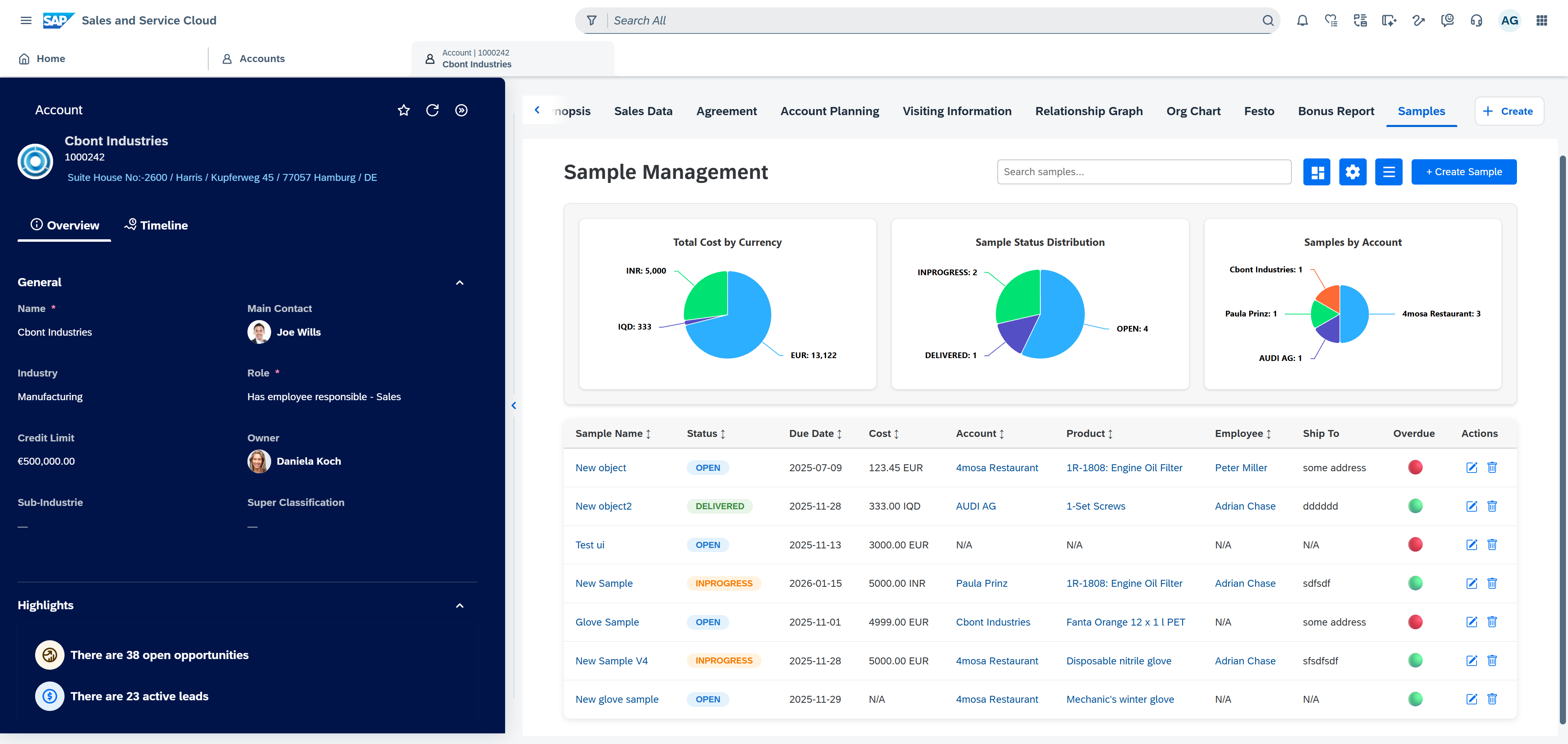
This page is still a bit work in progress and the idea is to add a video that shows live the development process with AI and also demonstrates the final frontend application.
- Watch the Development Process
- Try It Yourself
- Features
- Technology Stack
- Backend Integration
- Getting Started
- Usage Guide
- Project Structure
- Angular Best Practices
- SAP Design Integration
- Built with GitHub Copilot
- License Notes
- Related Resources
- Extensions - Wanna Know More?
Want to see how this application was built from scratch using AI? Watch the complete development process in this video:
Building a Custom Frontend for SAP Sales Cloud V2 with GitHub Copilot
In this video, you'll see:
- 🤖 Live AI-assisted development - Watch GitHub Copilot generate code in real-time
- 🛠️ Complete build process - From initial setup to production-ready application
- 🔗 SAP Sales Cloud integration - How to embed the custom frontend into SAP Sales and Service Cloud V2
- 💡 Best practices and tips - Learn effective prompting techniques for AI-assisted development
Want to build your own custom frontend with AI assistance? Check out MY_PROMPT.md to see the exact prompt I used with GitHub Copilot to create this entire application!
The prompt demonstrates how to:
- Structure detailed requirements for AI assistants
- Provide API examples and payload structures
- Specify design requirements and business logic
- Request integration with external systems (CRM)
Use it as a template for your own projects - just replace the endpoints, data model, and business rules with your own requirements. The more specific you are, the better results you'll get!
- ✅ Full CRUD Operations - Create, Read, Update, and Delete samples
- ✅ Responsive Table View - Display all samples with SAP Horizon design
- ✅ Advanced Sorting - Click column headers to sort, click again to reverse, click third time to clear
- ✅ Real-time Filtering - Search across multiple fields (name, status, account, product, employee)
- ✅ Column Management - Show/hide columns dynamically via settings menu
- ✅ Inline Editing - Double-click cells to edit Sample Name, Status, or Ship To Address directly
- ✅ Modal Dialogs - Clean, compact modal windows for creating and editing samples
- ✅ Delete Confirmation - SAP-styled confirmation dialogs prevent accidental deletions
- ✅ Entity Lookups - Searchable dropdowns for Accounts, Opportunities, Products, Employees, and Service Cases
- ✅ CRM Navigation - Click links to navigate to related CRM objects in SAP Sales Cloud
- ✅ Quick Create Menu - Burger menu with shortcuts to create Opportunities, Samples, Products, Accounts, and Cases in CRM
- ✅ Opportunity Context - When opened from an opportunity, automatically pre-fills account and filters products to those on the opportunity
- ✅ Address Auto-fill - Automatically loads ship-to address from selected account
- ✅ Interactive Dashboard - Toggle-able dashboard with real-time analytics
- ✅ Highcharts Integration - Three interactive pie charts:
- Samples by Status (OPEN, IN PROGRESS, DELIVERED, etc.)
- Samples by Packaging Type (PLASTIC, METAL, OTHER MATERIAL)
- Samples by Sample Type (WITH PACKAGING, WITHOUT PACKAGING)
- ✅ Click-to-Filter - Click chart segments to filter the table by that category
- ✅ URL Parameter Support - Filter by opportunityId or accountId via URL parameters
- ✅ Responsive Design - Compact modals that work on various screen sizes
- ✅ SAP Horizon Theme - Full integration with SAP Sales Cloud V2 design system
- ✅ Loading States - User feedback during data operations
- ✅ Error Handling - Graceful error messages and fallbacks
- Angular 20+ with standalone components (no NgModules)
- Signals for reactive state management
- New Control Flow (@if, @for, @switch) replacing *ngIf, *ngFor
- Reactive Forms for data entry and validation
- HttpClient with Basic Authentication for SAP CAP backend
- OnPush Change Detection for optimal performance
- Highcharts for data visualization (used under non-commercial license for demo purposes)
- SAP Horizon Design System for consistent enterprise UI
- TypeScript with strict type checking
This frontend connects to the SAP CAP backend created in the tutorial: SSv2-custom-sample-object
Sample Service (CAP Backend):
https://xxxxxx-samplejl.cfapps.eu10-004.hana.ondemand.com/sample-service/Samples
CRM Integration (SAP Sales Cloud V2):
https://my999999.crm.cloud.sap/sap/c4c/api/v1/
├── account-service/accounts
├── opportunity-service/opportunities
├── product-service/products
├── employee-service/employees
└── service-case-service/service-cases
The application uses Basic Authentication to connect to both the CAP backend and the CRM APIs.
- Node.js 20+ and npm
- Git
git clone https://github.com/jens-limbach/SSv2-custom-frontend-ai.git
cd SSv2-custom-frontend-ai- Copy the credentials template file:
cp src/app/config/credentials.template.ts src/app/config/credentials.ts- Edit
src/app/config/credentials.tsand add your actual credentials:
export const CRM_CONFIG = {
  baseUrl: 'https://myXXXXXX.demo.crm.cloud.sap',
  username: 'YOUR_USERNAME',
  password: 'YOUR_PASSWORD'
};

export const CAP_CONFIG = {
  baseUrl: 'https://your-cap-backend.cfapps.eu10-004.hana.ondemand.com/sample-service/Samples'
};npm installnpm startNavigate to http://localhost:4200/. The application will automatically reload if you change any of the source files.
npm run buildThe build artifacts will be stored in the dist/ directory.
- Login to Cloud Foundry:
cf login -a https://api.cf.eu10-004.hana.ondemand.com- Push the application:
cf pushThe application will be deployed according to the configuration in manifest.yml. You can access your deployed application at the URL provided by Cloud Foundry after successful deployment.
Note: Make sure you have:
- Installed the Cloud Foundry CLI
- Proper Cloud Foundry credentials and space access
- A
manifest.ymlfile in your project root (already included)
- All samples are displayed in a table on the main page
- Use the search box to filter samples by name, status, account, product, or employee
- Use URL parameters to pre-filter:
?opportunityId=xxx- Show only samples for a specific opportunity?accountId=xxx- Show only samples for a specific account
- Click any column header to sort ascending
- Click again to sort descending
- Click a third time to remove sorting
- Click the ⚙️ settings icon to show/hide columns
- Choose which fields you want to display in the table
- Settings persist during your session
- Click "Show Dashboard" button to reveal analytics
- Three interactive Highcharts pie charts show distribution by:
- Status (OPEN, IN PROGRESS, DELIVERED, RETURNED, OVERDUE)
- Packaging Type (PLASTIC, METAL, OTHER MATERIAL)
- Sample Type (WITH PACKAGING, WITHOUT PACKAGING)
- Click any chart segment to filter the table by that category
- Click "Hide Dashboard" to collapse the analytics view
Standard Creation:
- Click the "+ Create Sample" button
- Fill in all required fields (marked with *)
- Select related CRM entities from searchable dropdowns
- Click "Create Sample" to save
Quick Create from CRM:
- Click the burger menu (☰) next to settings
- Select an option (Create Opportunity, Sample, Product, Account, or Case)
- Opens the CRM quick create dialog for that entity
Opportunity Context Creation:
- When you open the app from an opportunity in CRM (with
?opportunityId=xxx), the create dialog automatically:- Pre-fills the Opportunity field
- Pre-fills the Account field from the opportunity
- Filters Products to only those on that opportunity
- Loads the ship-to address from the account
Via Modal:
- Click the edit (✏️) button on any row
- Modify fields in the dialog
- Click "Update Sample" to save changes
Inline Editing:
- Double-click on Sample Name, Status, or Ship To Address cells
- Edit the value directly in the table
- Press Enter or click outside to save
- Press Escape to cancel changes
- Click any linked entity (Account, Opportunity, Product, Employee, Service Case) in the table
- Navigates to that object in SAP Sales Cloud V2 (when embedded in CRM)
- Click the delete (🗑️) button on any row
- Confirm the deletion in the SAP-styled confirmation dialog
src/
├── app/
│   ├── components/
│   │   ├── samples-list/              # Main table with filtering, sorting, inline editing
│   │   ├── create-sample-modal/       # Create dialog with CRM integration
│   │   ├── edit-sample-modal/         # Edit dialog
│   │   ├── delete-confirmation-modal/ # Confirmation dialog
│   │   ├── entity-selector/           # Reusable searchable dropdown component
│   │   └── dashboard/                 # Highcharts analytics dashboard
│   ├── models/
│   │   ├── sample.model.ts            # Sample entity interfaces
│   │   └── crm-entities.model.ts      # CRM entity interfaces
│   ├── services/
│   │   ├── sample.service.ts          # Sample CRUD operations
│   │   └── crm.service.ts             # CRM API integration
│   ├── app.component.ts               # Root component
│   └── app.config.ts                  # App configuration with HTTP interceptors
├── index.html                          # SAP Horizon theme integration
├── main.ts                             # Application bootstrap
└── styles.css                          # Global styles (SAP design variables)
✅ Standalone components (no NgModules)
✅ Signals for state management
✅ New control flow syntax (@if, @for)
✅ input() and output() functions
✅ inject() function instead of constructor injection
✅ OnPush change detection strategy
✅ Reactive forms over template-driven
✅ Class bindings instead of ngClass
✅ Style bindings instead of ngStyle
✅ Angular rules file - Using .github/copilot-instructions.md for GitHub Copilot to follow Angular best practices
This project includes a .github/copilot-instructions.md file that provides GitHub Copilot with Angular-specific best practices and coding conventions. These rules files help AI assistants generate better, more idiomatic Angular code.
For other AI tools:
- Cursor: Use
.cursorrulesfile - Firebase Studio: Use
.airules.mdfile - JetBrains IDEs: Use
.guidelines.mdfile - VS Code with other extensions: Use
.instructions.mdfile
Learn more about AI-assisted Angular development: Angular AI Development Guide
The application uses SAP Sales Cloud V2 web components and the SAP Horizon theme for a consistent enterprise look and feel that seamlessly integrates with SAP Sales Cloud.
Key Design Features:
- SAP Horizon color palette and spacing
- Native SAP Sales Cloud navigation integration
- Confirmation dialogs matching SAP CX styling
- Consistent typography and iconography
- Responsive tables and forms following SAP guidelines
This entire application was developed collaboratively using GitHub Copilot as an AI pair programmer, demonstrating how modern AI tools can dramatically accelerate custom frontend development for SAP ecosystems.
Initial Setup (5 minutes)
- Created Angular 20 project with standalone components
- Configured TypeScript and build settings
- Set up SAP Horizon theme integration
Core Features (30 minutes)
- Implemented CRUD operations with reactive forms
- Built table with sorting and filtering
- Created modal dialogs for create/edit operations
- Added inline editing for quick updates
CRM Integration (30 minutes)
- Connected to SAP Sales Cloud V2 APIs
- Built entity selector component for related objects
- Implemented CRM navigation via postMessage
- Added quick create menu for various CRM entities
Advanced Features (60 minutes)
- Developed opportunity context feature
- Built analytics dashboard with Highcharts
- Added column management settings
- Implemented URL parameter filtering
- Made modals responsive and compact
Total Development Time: ~2.5 hours 🚀
✅ Code Generation - Generated boilerplate for components, services, and models
✅ Best Practices - Suggested Angular 20+ patterns (signals, new control flow, inject())
✅ API Integration - Wrote HTTP client code and authentication headers
✅ Type Safety - Created TypeScript interfaces from API responses
✅ Styling - Applied SAP Horizon design tokens and CSS
✅ Debugging - Identified issues with filtering, form values, and data binding
✅ Refactoring - Improved code structure based on user feedback
✅ Documentation - Helped write comprehensive comments and this README
Speed: What would traditionally take days or weeks was built in hours
Quality: Modern Angular patterns and best practices applied throughout
Learning: Even developers new to Angular 20+ can build production-quality apps
Iteration: Quick feedback loops allowed for rapid feature additions and refinements
- Be Specific: Mention "Angular 20", "signals", "standalone components" for modern patterns
- Provide Context: Share API responses, error messages, and existing code structure
- Iterate: Start simple, then enhance with CRM integration and advanced features
- Leverage Domain Knowledge: Copilot understands SAP concepts like opportunities, accounts, products
- Refine Together: Use Copilot suggestions as a starting point, then refine collaboratively
Application Code: Open source for educational/demo purposes
Highcharts: Used under non-commercial license for demonstration
SAP Components: Provided by SAP for Sales Cloud V2 integration
This is a demonstration project created as a tutorial companion. For commercial use, please ensure appropriate licensing for all dependencies.
- Backend Tutorial: SSv2-custom-sample-object
- Angular Documentation: angular.dev
- SAP Sales Cloud V2 API: SAP API Business Hub
- GitHub Copilot: github.com/features/copilot
Built as a hands-on demonstration of modern frontend development for SAP Sales Cloud V2, showcasing the power of AI-assisted development with GitHub Copilot.
Are you interested how you can extend SAP Sales and Service Cloud Version 2? I cover each recommended possibility from in-app to pro-code in my videos and hands-on tutorials!
The videos show you step-by-step how to do it and not only the "finished" extensions and the tutorials complement those by giving you each single step in order to try it out yourself or to use it for a hands-on workshop! All you need is the curiosity to learn something new 😊
- Basic customizing (Video 3m)
- In-App Extensibility (Video 5m)
- Extensibility Workshop (Video 17m | Hands-On Tutorial)
- First Side-by-Side app on BTP
- Custom Logic via a Microservice (trigger via Autoflow)
- Custom Key Metrics
- Building a Custom Object with standard frontend (Video 18m | Hands-On Tutorial)
- Building a custom frontend using AI (Video 15m | Hands-On Tutorial)
New to SAP Sales and Service Cloud Version 2? - check out this video microsite where I show many of the solution capabilities but also some more tech deep dives in short, hands-on and non-marketing videos :)