-
Notifications
You must be signed in to change notification settings - Fork 50
⏳ Waiting for dependency: feat: new guide - B2B per usage billing setup #653
New issue
Have a question about this project? Sign up for a free GitHub account to open an issue and contact its maintainers and the community.
By clicking “Sign up for GitHub”, you agree to our terms of service and privacy statement. We’ll occasionally send you account related emails.
Already on GitHub? Sign in to your account
Open
Arobce
wants to merge
10
commits into
kinde-oss:main
Choose a base branch
from
Arobce:main
base: main
Could not load branches
Branch not found: {{ refName }}
Loading
Could not load tags
Nothing to show
Loading
Are you sure you want to change the base?
Some commits from the old base branch may be removed from the timeline,
and old review comments may become outdated.
Open
Changes from 5 commits
Commits
Show all changes
10 commits
Select commit
Hold shift + click to select a range
72be94b
`add:` b2b per usage billing setup guide
Arobce 8e6a5fa
`refactor:` change file name
Arobce 8c28752
`refactor:` updated date
Arobce fa5cdaa
`refactor:` coderabbit improvements
Arobce 678092e
`add:` screenshots for clarity
Arobce 83bb54c
`fix:` typo in Sign in
Arobce 89239c9
`fix:` updates docs to match new kinde style
Arobce 203000b
Merge branch 'kinde-oss:main' into main
Arobce 91bf4c0
`edit:` makes suggested improvements
Arobce e38b0bc
Add table of contents metadata
tamalchowdhury File filter
Filter by extension
Conversations
Failed to load comments.
Loading
Jump to
Jump to file
Failed to load files.
Loading
Diff view
Diff view
Some comments aren't visible on the classic Files Changed page.
There are no files selected for viewing
Some generated files are not rendered by default. Learn more about how customized files appear on GitHub.
Oops, something went wrong.
288 changes: 288 additions & 0 deletions
288
src/content/docs/billing/implementation-guide/b2b-saas-per-usage-billing-setup.mdx
This file contains hidden or bidirectional Unicode text that may be interpreted or compiled differently than what appears below. To review, open the file in an editor that reveals hidden Unicode characters.
Learn more about bidirectional Unicode characters
| Original file line number | Diff line number | Diff line change |
|---|---|---|
| @@ -0,0 +1,288 @@ | ||
| --- | ||
| page_id: 9c7d4e5a-6b8f-4c2a-9e3d-1f5a7c8b2d6e | ||
| title: B2B SaaS billing with organizations and per-user pricing | ||
| sidebar: | ||
| order: 1 | ||
| description: Implement a standard B2B SaaS architecture in Kinde with organization-scoped access control, administrator-managed billing, and per-user pricing via metered features. | ||
| metadata: | ||
| topics: [billing, b2b, organizations, per-user pricing, metered usage, implementation] | ||
| sdk: [] | ||
| languages: [] | ||
| audience: [developer] | ||
| complexity: intermediate | ||
| keywords: [b2b saas, per-user pricing, seat-based billing, metered features, organization billing, implementation guide] | ||
| updated: 2026-01-15 | ||
| featured: false | ||
| deprecated: false | ||
| ai_summary: Complete guide to implementing B2B SaaS billing in Kinde with organizations, per-user seat-based pricing, metered features, and multiple user join patterns for administrators to manage subscriptions. | ||
| --- | ||
|
|
||
| This guide describes how to implement a **standard B2B SaaS architecture** in **Kinde** using: | ||
|
|
||
| - Organization-scoped access control | ||
| - Administrator-managed billing | ||
| - Fixed **per-user (seat-based)** pricing via metered features | ||
| - Multiple supported organization join patterns | ||
|
|
||
| This guide is intended for developers building B2B products on Kinde, who want to reproduce a typical organization-based billing model. | ||
|
|
||
| ## Guide Overview | ||
|
|
||
| The recommended high-level implementation flow is: | ||
|
|
||
| 1. Configure a per-user billing plan | ||
| 2. Define who can manage billing at the organization level | ||
| 3. Enable organization creation | ||
| 4. Handle the first user (organization creator) | ||
| 5. Allow additional users to join the organization | ||
| 6. Track seat usage for billing | ||
|
|
||
| Kinde is **API-first and flexible**. Some organization join flows are supported out of the box, while others can be implemented using the Management API depending on product requirements. | ||
|
|
||
| ## 1. Connect Stripe | ||
|
|
||
| Connect your **Stripe** account from the Kinde dashboard. | ||
|
|
||
| Notes: | ||
|
|
||
| - Test and live environments are supported | ||
| - Published plans are automatically synced to Stripe | ||
| - Stripe products and prices are managed by Kinde | ||
|
|
||
| **Learn more:** [Manage Stripe connection](https://docs.kinde.com/billing/payment-management/manage-stripe-connection/) | ||
|
|
||
| ## 2. Configure a per-user billing plan | ||
|
|
||
| Create a billing plan with a **metered feature** representing users or seats. The plan must be created for **Organizations**. | ||
|
|
||
| ### Create an organization plan | ||
|
|
||
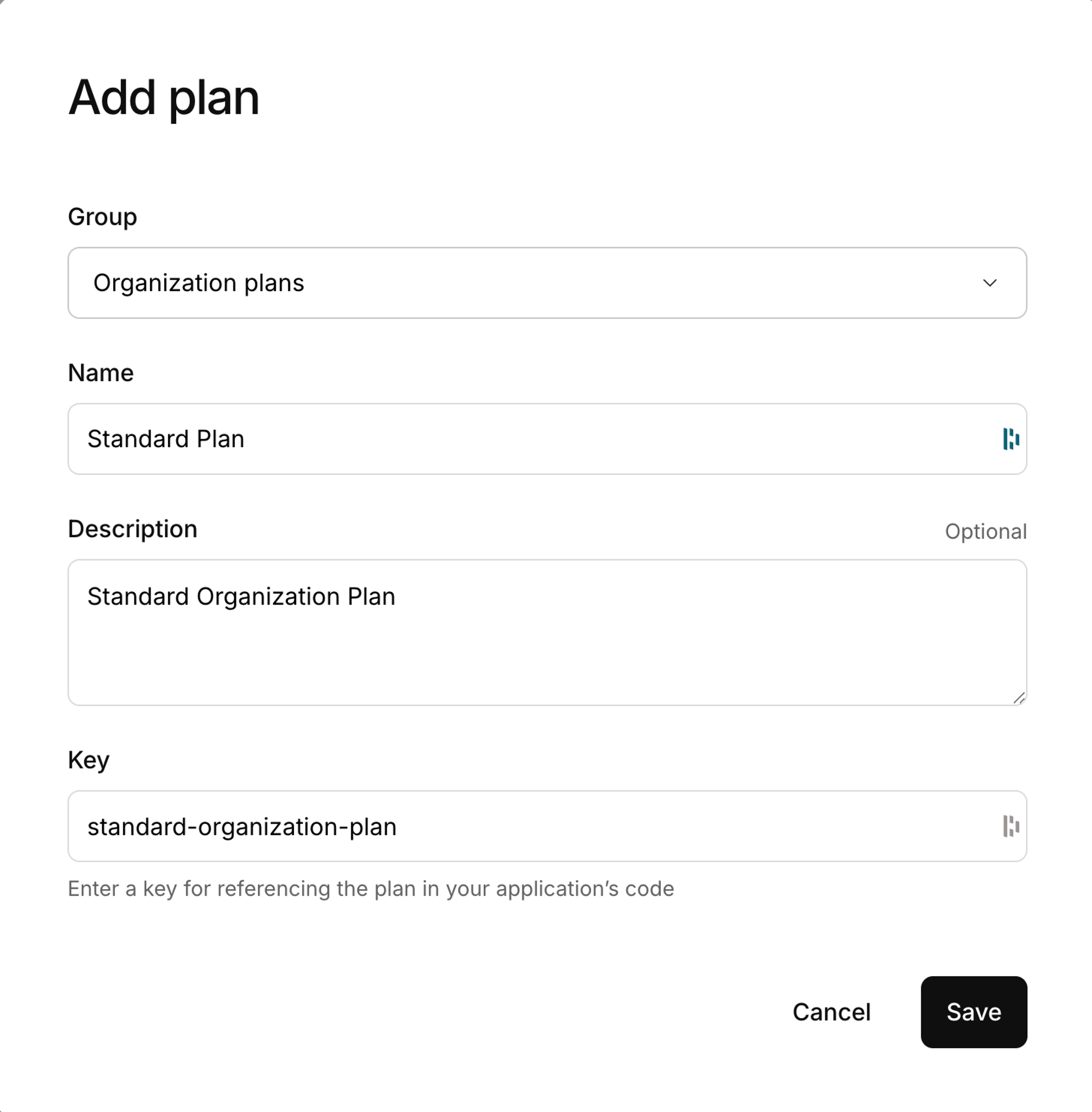
| 1. Go to **Billing** | ||
| 2. Select **Add a plan** | ||
| 3. In **This plan is for**, select **Organizations** | ||
| 4. Provide a name, description, key, and currency | ||
| 5. Save the plan | ||
|
|
||
|  | ||
|
|
||
| ### Add a metered feature to the plan | ||
|
|
||
| 1. In the plan, scroll to **Features and pricing** | ||
| 2. Select **Add feature** | ||
| 3. Choose **New metered** | ||
|
|
||
| Configure the feature: | ||
|
|
||
| - **Feature name** | ||
|
|
||
| `Users` | ||
|
|
||
| - **Key** | ||
|
|
||
| `user` | ||
|
|
||
| This key is required when submitting metered usage. | ||
|
|
||
| - **Maximum units** | ||
|
|
||
| Leave empty for unlimited users, or set a limit if required. | ||
|
|
||
| - **Unit measurement name** | ||
|
|
||
| `user` or `seat` | ||
|
|
||
| - **Pricing model** | ||
|
|
||
| Per unit | ||
|
|
||
| - **Price per unit** | ||
|
|
||
| Fixed price per user | ||
|
|
||
| - **Line item description** | ||
|
|
||
| Example: `User seats` | ||
|
|
||
|
|
||
| Save the feature. | ||
|
|
||
| ### Optional: Add a base subscription charge | ||
|
|
||
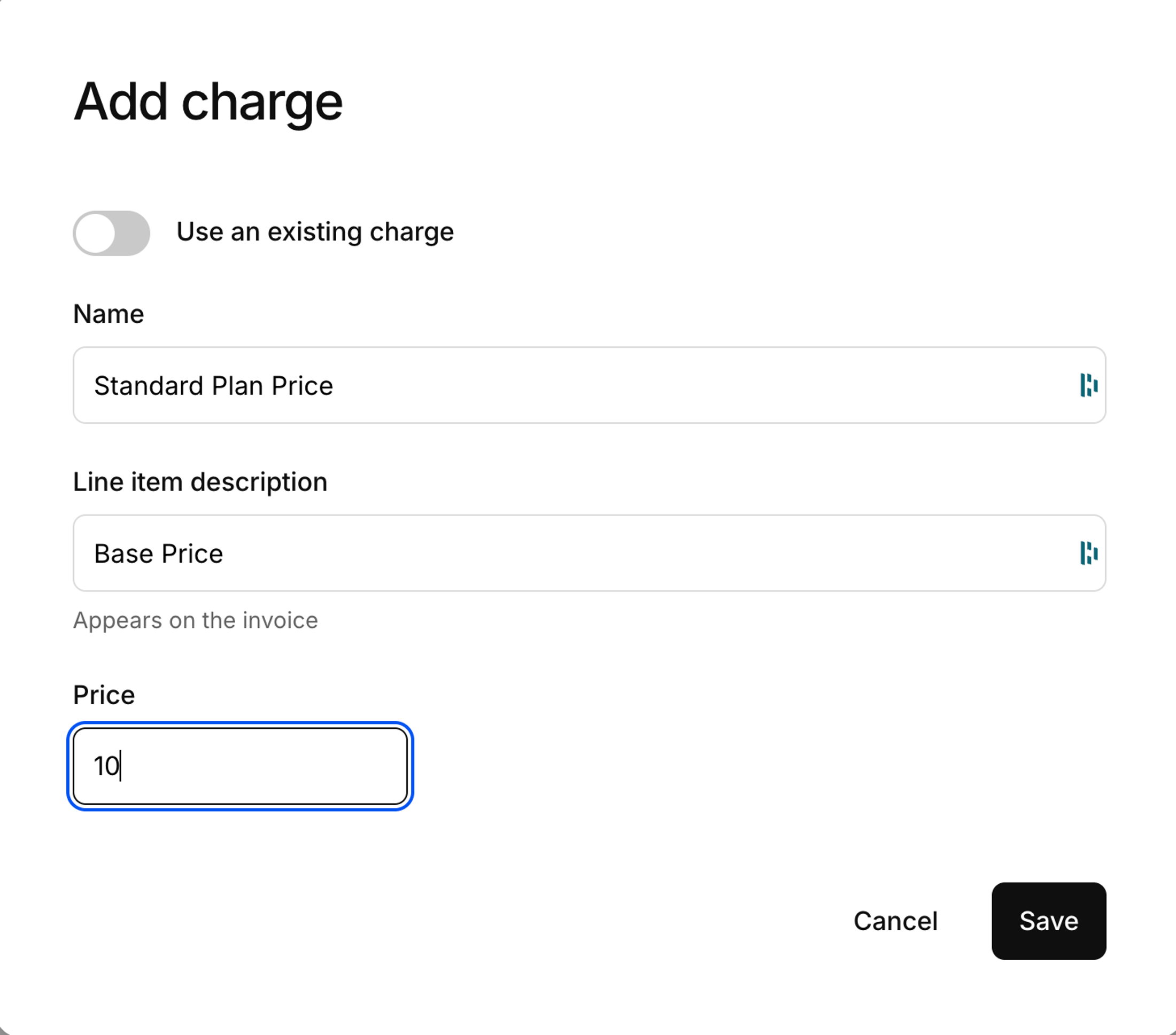
| If your pricing model requires a fixed base fee: | ||
|
|
||
| - Add a fixed charge to the plan | ||
| - Example name: `Base subscription fee` | ||
| - The price can be `$0.00` if billing is fully per-user | ||
|
|
||
|  | ||
|
|
||
| ### Publish the plan | ||
|
|
||
| Plans must be **published** before they: | ||
|
|
||
| - Appear in pricing tables | ||
| - Are selectable during signup | ||
| - Sync to Stripe | ||
|
|
||
| ## 3. Generate a pricing table | ||
|
|
||
| 1. Go to **Dashboard → Billing → Pricing tables** | ||
| 2. Create or customize a pricing table | ||
| 3. Toggle **Make live** | ||
|
|
||
| The pricing table key is required when initiating signup with plan selection. | ||
|
|
||
|
|
||
| ## 4. Create a Billing Admin role | ||
|
|
||
| Organization administrators require a role that allows them to manage billing. | ||
|
|
||
| **Steps** | ||
|
|
||
| 1. Go to **Settings → Roles** | ||
| 2. Select **Add role** | ||
| 3. Configure: | ||
| - **Name:** Billing Admin | ||
| - **Key:** billing-admin | ||
| - **Assign to the creator if organizations self-sign up:** Enabled | ||
| - **System permission:** `org:write:billing` | ||
| 4. Save | ||
|
|
||
| Users with this role can manage subscriptions, plans, and payment methods for their organization. | ||
|
|
||
| ## 5. Organization creation (first user) | ||
|
|
||
| Enable organization creation during signup. | ||
|
|
||
| - Go to **Settings → Environment → Organizations** | ||
| - Enable **Organization creation during signup** | ||
|
|
||
|
|
||
| ### Trigger organization creation from your application | ||
|
|
||
| ```jsx | ||
| <RegisterLink | ||
| orgName="Paid Users Organization" | ||
| isCreateOrg | ||
| pricingTableKey="your_pricing_table_key" | ||
| > | ||
| Sign up your company | ||
| </RegisterLink> | ||
|
|
||
| ``` | ||
|
|
||
| ### Direct authorization URL | ||
|
|
||
| ``` | ||
| https://<your_subdomain>.kinde.com/oauth2/auth | ||
| ?response_type=code | ||
| &client_id=YOUR_CLIENT_ID | ||
| &redirect_uri=YOUR_REDIRECT_URI | ||
| &scope=openid profile email | ||
| &is_create_org=true | ||
| &pricing_table_key=YOUR_PRICING_TABLE_KEY | ||
|
|
||
| ``` | ||
|
|
||
|
|
||
| ### Signup flow behavior | ||
|
|
||
| 1. The user registers | ||
| 2. A new organization is created | ||
| 3. The user is assigned the Billing Admin role | ||
| 4. The pricing table is displayed | ||
| 5. Payment details are collected | ||
| 6. The organization is created with an active subscription | ||
|
|
||
|
|
||
| ## 6. Adding users to an existing organization | ||
|
|
||
| Once an organization exists, additional users can join using multiple supported approaches. | ||
|
|
||
| - The appropriate authentication (email + password, email + code, etc.) method is enabled | ||
| - **Org → Policies → Allow org members to be auto-added** is enabled | ||
|
|
||
|
|
||
|
|
||
| ### Option 1: Manual addition (dashboard) | ||
|
|
||
| - No custom code required | ||
| - Intended for internal or low-volume use | ||
|
|
||
|
|
||
|
|
||
| ### Option 2: Self sign-up using `orgCode` (recommended) | ||
|
|
||
| Users sign up or log in using an organization code. | ||
|
|
||
| ```jsx | ||
| <RegisterLink orgCode="org_8d350c10295bf"> | ||
| Sign up | ||
| </RegisterLink> | ||
| ``` | ||
|
|
||
| ```jsx | ||
| <LoginLink orgCode="org_8d350c10295bf"> | ||
| Signin | ||
| </LoginLink> | ||
| ``` | ||
|
Arobce marked this conversation as resolved.
|
||
|
|
||
|
|
||
|
|
||
| Behavior: | ||
|
|
||
| - User authenticates | ||
| - User is automatically added to the specified organization | ||
|
|
||
| This is the **recommended default** for most B2B SaaS applications. | ||
|
|
||
|
|
||
|
|
||
| ### Option 3: Auto-add users from allowed domains | ||
|
|
||
| Users are automatically added to an organization based on their email domain. | ||
|
|
||
| Enable: | ||
|
|
||
| 1. Allow org members to be auto-added | ||
| 2. Enable auto-add users from allowed domains | ||
| 3. Add allowed domains (for example, `company.com`) | ||
|
|
||
| Example: | ||
|
|
||
| A user signing up with `jane@acme.com` is automatically added to the Acme organization. | ||
|
|
||
|
|
||
|
|
||
| ## 7. Tracking seat usage for billing | ||
|
|
||
| Kinde does **not automatically calculate seat counts** for metered billing. Applications must submit usage updates. | ||
|
|
||
| ### When to submit usage | ||
|
|
||
| Common triggers include: | ||
|
|
||
| - A user is added to an organization | ||
| - A user is removed or deactivated | ||
| - A scheduled reconciliation job (recommended) | ||
|
|
||
| ### How to submit usage | ||
|
|
||
| Usage can be submitted using: | ||
|
|
||
| - Management API | ||
| - Workflows (example: [Track org seat usage workflow](https://github.com/kinde-starter-kits/workflow-examples/blob/main/billing/trackOrgSeatUsageWorkflow.ts)) | ||
| - Billing webhooks | ||
|
|
||
| This ensures billed usage reflects the number of **active users** in the organization. | ||
|
|
||
|
Arobce marked this conversation as resolved.
Outdated
|
||
|
|
||
| ## Troubleshooting | ||
|
|
||
| ### Pricing table not shown during signup | ||
|
|
||
| Verify: | ||
|
|
||
| - The pricing table is **live** | ||
| - **Settings → Billing → Billing experience → Show pricing table during signup** is enabled | ||
| - The `pricingTableKey` matches the intended pricing table | ||
This file contains hidden or bidirectional Unicode text that may be interpreted or compiled differently than what appears below. To review, open the file in an editor that reveals hidden Unicode characters.
Learn more about bidirectional Unicode characters
Add this suggestion to a batch that can be applied as a single commit.
This suggestion is invalid because no changes were made to the code.
Suggestions cannot be applied while the pull request is closed.
Suggestions cannot be applied while viewing a subset of changes.
Only one suggestion per line can be applied in a batch.
Add this suggestion to a batch that can be applied as a single commit.
Applying suggestions on deleted lines is not supported.
You must change the existing code in this line in order to create a valid suggestion.
Outdated suggestions cannot be applied.
This suggestion has been applied or marked resolved.
Suggestions cannot be applied from pending reviews.
Suggestions cannot be applied on multi-line comments.
Suggestions cannot be applied while the pull request is queued to merge.
Suggestion cannot be applied right now. Please check back later.
Uh oh!
There was an error while loading. Please reload this page.