Plug-and-play request tracking middleware for FastAPI apps.
Built for devs who care about API usage, performance, and observability.


- 🧐 About
- 🏁 Getting Started
- 🔧 Configuration
- 🚀 Deployment
- 🎈 Usage & CLI Tool
- 📊 Logged Fields
- 🔐 Security
- 🧪 Testing
- ⛏️ Built Using
- ✅ TODO
- 🤝 Contributing
- ✍️ Authors
- 🎉 Acknowledgements
DevTrack SDK is a powerful and lightweight middleware for FastAPI apps that automatically logs HTTP requests. Track path, method, status, duration, user agent, and more — right from your app with no extra configuration. Perfect for development, testing, and production environments.
Key Features:
- ✨ Zero configuration required
- 🚀 Lightweight and non-blocking
- 📊 Comprehensive request tracking
- 🔒 Security-first design
- 🎯 Easy integration with FastAPI
python >= 3.8
pip install fastapi httpx starlettepip install devtrack-sdkfrom fastapi import FastAPI
from devtrack_sdk.middleware import DevTrackMiddleware
from devtrack_sdk.controller import router as devtrack_router
app = FastAPI()
app.include_router(devtrack_router)
app.add_middleware(DevTrackMiddleware)That's it! Your app is now tracking requests automatically.
The middleware works out of the box with sensible defaults. You can customize it by passing options:
app.add_middleware(
    DevTrackMiddleware,
    exclude_path=["/endpoint1", "/endpoint2"]  # Paths to exclude from tracking
)For different environments, you can configure the middleware accordingly:
import os

middleware_config = {
    "development": {
        "skip_paths": ["/docs", "/redoc", "/health"],
    },
    "production": {
        "skip_paths": ["/health", "/metrics"],
    }
}

env = os.getenv("ENV", "development")
app.add_middleware(DevTrackMiddleware, exclude_path=middleware_config[env]["skip_paths"])uvicorn main:app --reloadTest the tracking endpoint:
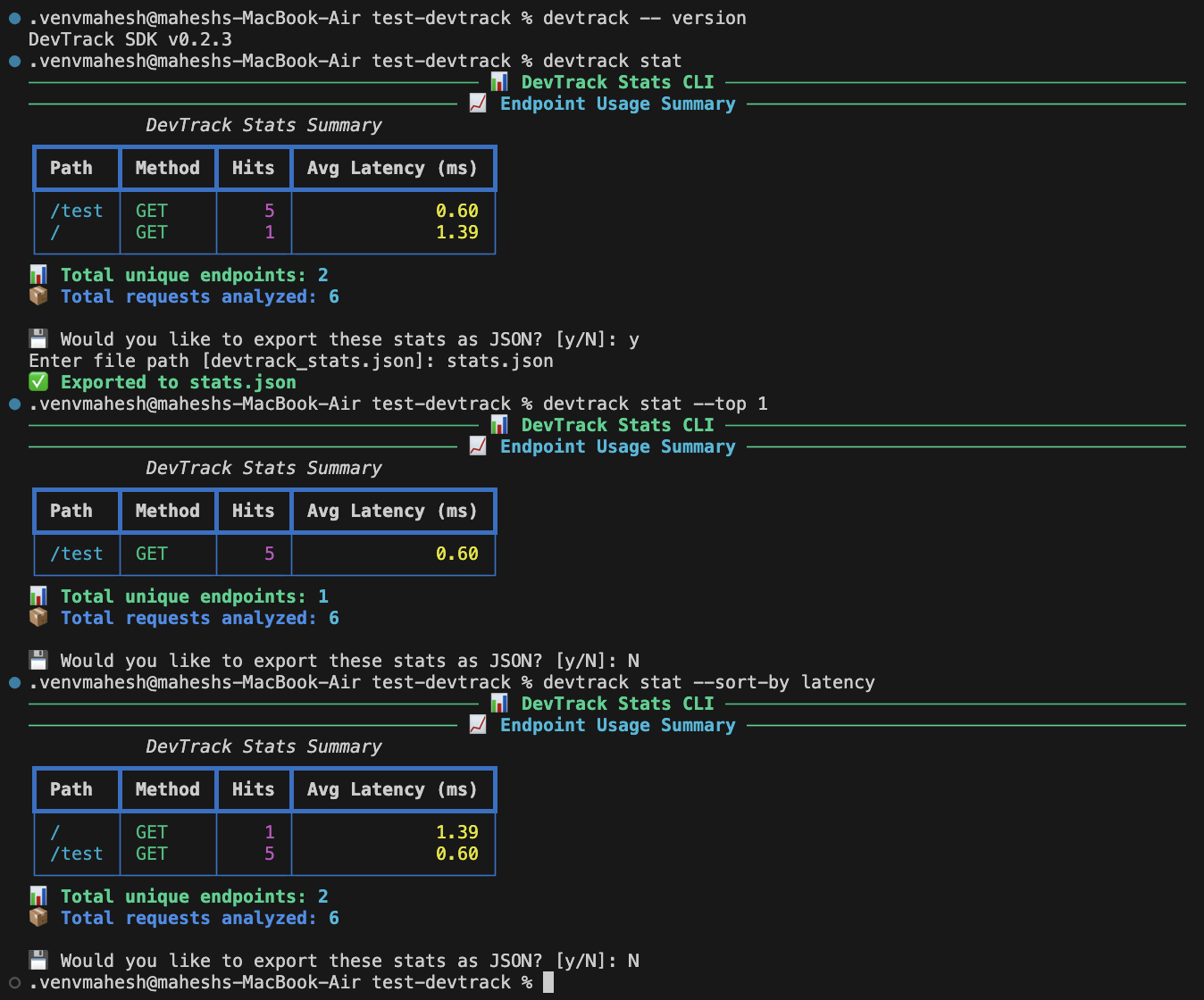
curl http://localhost:8000/__devtrack__/statsDevTrack SDK now comes with a CLI tool (available as the "devtrack" command) to help you manage your project. For example, you can run:
devtrack -- versionto display the current SDK version, or
devtrack statto detect and display stats (for example, from your local endpoint).
Below is a demo screenshot of the CLI tool in action:
All tracked data is stored in memory and served via:
GET /__devtrack__/stats
Response format:
{
    "total": 42,
    "entries": [
        {
            "path": "/api/users",
            "method": "GET",
            "status_code": 200,
            "timestamp": "2024-03-20T10:00:00Z",
            "duration_ms": 150.5,
            // ... other fields
        }
    ]
}Each request is logged with these fields:
path: request endpointmethod: HTTP method (GET, POST, etc.)status_code: HTTP response codetimestamp: ISO timestamp (UTC)client_ip: origin IP addressduration_ms: time taken for request to completeuser_agent: browser/client making the requestreferer: previous page (if any)query_params: any query string datarequest_body: POST/PUT payload (filtered)response_size: response size in bytesuser_id,role: if available from headerstrace_id: unique ID for each request
DevTrack SDK is designed with security in mind:
- 🔒 No API keys required for basic usage
- 🛡️ Automatic filtering of sensitive data
- 🔐 Optional authentication for stats endpoint (coming soon)
- 🚫 Configurable path exclusions
- 🔍 Environment-aware configuration
For production deployments, we recommend:
- Using environment variables for configuration
- Implementing proper access control for the stats endpoint
- Excluding sensitive paths from tracking
- Monitoring the stats endpoint for unusual activity
Run the test suite:
pytest tests/The SDK includes comprehensive tests for:
- Middleware functionality
- Request tracking
- Path exclusions
- Error handling
- Performance impact
- 🔹 FastAPI – Modern, fast web framework
- 🔹 Starlette – ASGI framework/toolkit
- 🔹 httpx – Modern HTTP client
Upcoming features and improvements:
- In-memory logging
- Full request metadata
- Simplified configuration
- 🚫 Path exclusion patterns
- 🧰 CLI tool (with "version" and "stat" commands)
- ⏱️ Latency percentiles (P50, P95, P99)
- 🧩
devtrack.jsonconfiguration - 🔐 Token-based authentication
- 🎯
@track()decorator - 📈 Dashboard UI
- 💾 Database support
- 📦 Log exporters
For more detailed plans and tasks, please refer to the TODO in the project repository.
Have an idea to improve DevTrack SDK?
We'd love to hear from you — whether it's a feature request, performance tweak, or integration idea.
👉 Open an issue to share your thoughts
or
💬 Join the discussion in GitHub Discussions
Together we can make DevTrack even better for the FastAPI ecosystem. 🚀
We ❤️ contributions! Please:
- Fork this repo
- Create your branch (
git checkout -b feat/awesome-feature) - Commit your changes (
git commit -m '✨ Add awesome feature') - Push to the branch (
git push origin feat/awesome-feature) - Open a Pull Request
Run pre-commit run --all-files before committing 🙏
- Mahesh Solanke – Core Dev & Maintainer
- ✨ Inspired by FastAPI's middleware design
- 💡 Thanks to the open-source community for tooling and inspiration