
A task orchestration system designed to be efficient, fast and developer-friendly.


- Motivation
- Overview
- Getting Started
- Adding to an existing app
- Multi-node setup
- Features
- Examples
- Upgrading from 0.1.29
As a CTO and founder, I was tired of spending buckets of money to set up and manage Airflow, dealing with multiple databases, countless processes, Docker complexity, and of course its outdated and buggy UI. So we decided to build something that kept what we liked about Airflow and ditched what we didn’t. The result is Gust: a platform that’s 10× more efficient, faster, and far easier to set up.
Gust is the perfect fit for our needs, and I encourage you to try it and push it even further. There’s still plenty of room for improvements and new features. If you spot something or want to contribute an idea, don’t be shy! Drop an Issue or submit a PR.
defmodule HelloWorld do
  # `schedule` and `on_finished_callback` are optional.
  # You can use special expressions provided by the quantum package, ex: @daily, @hourly, and etc..
  # https://hexdocs.pm/quantum/crontab-format.html
  use Gust.DSL, schedule: "* * * * *", on_finished_callback: :notify_something

  # Gust logs are stored and displayed through GustWeb via Logger.
  require Logger

  # Gust.Flows is used to query Dag, Run, and Task.
  alias Gust.Flows

  # Defining a callback for when run is done.
  def notify_something(status, run) do
    dag = Flows.get_dag!(run.dag_id)
    message = "DAG: #{dag.name}; completed with status: #{status}"
    Logger.info(message)
  end

  # Declaring "first_task" task; setting a downstream task and telling Gust to store its result.
  task :first_task, downstream: [:second_task], save: true do
    greetings = "Hi from first_task"
    Logger.info(greetings)

    # You can get secrets created on the Web UI
    secret = Flows.get_secret_by_name("SUPER_SECRET")
    Logger.warning("I know your secret: #{secret.value}")

    # The return value must be a map when `save` is true.
    %{result: greetings}
  end

  # Declaring "second_task" task; using context to fetch another task result.
  task :second_task, ctx: %{run_id: run_id} do

    # Getting "first_task"'s result
    task = Flows.get_task_by_name_run("first_task", run_id)

    Logger.info(task.result)
  end
end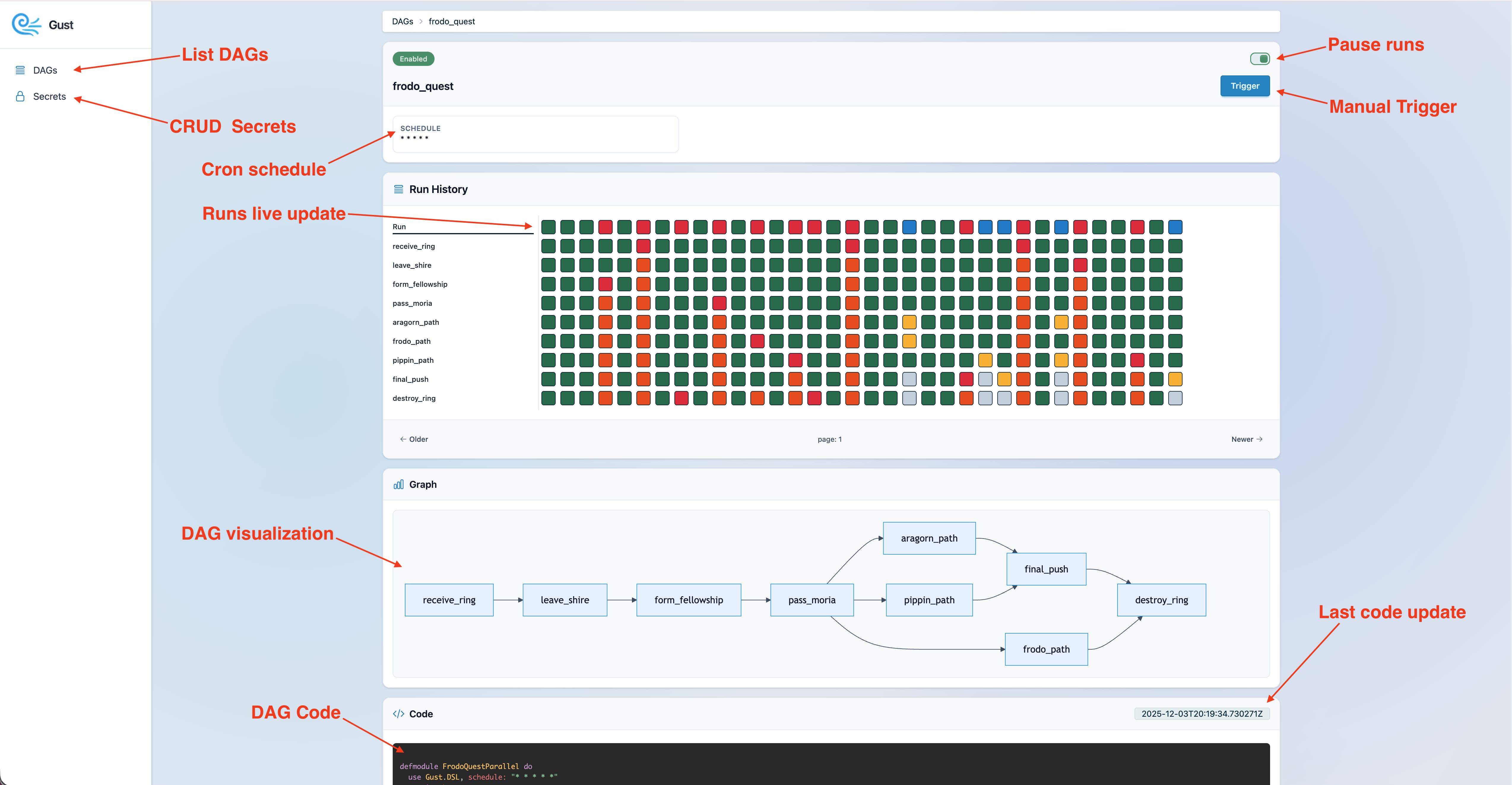
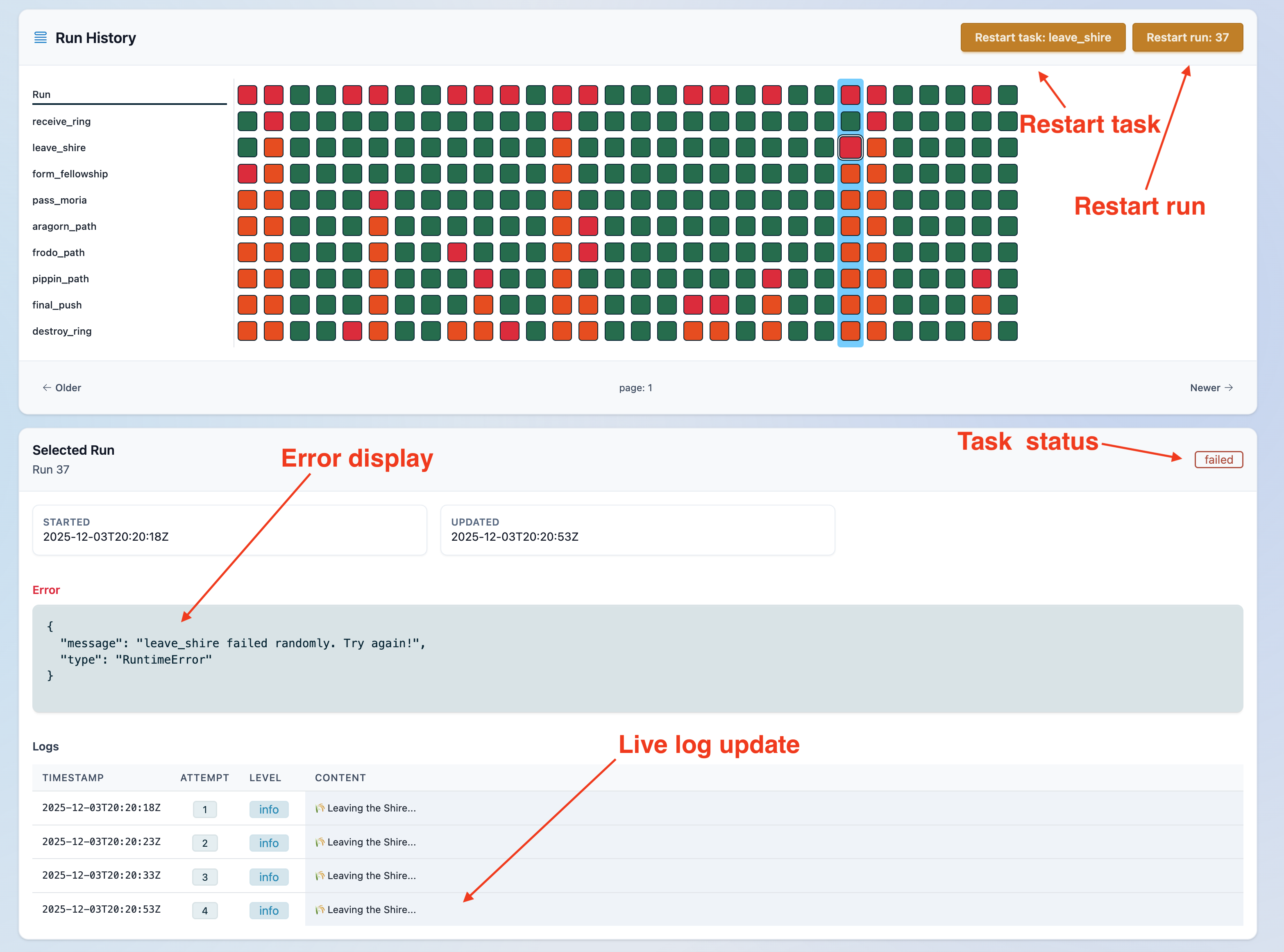
Want to try Gust quickly? Start with the Docker example. If you want full customization and extension, follow the instructions below to create a Gust app from scratch.
- macOS/Ubuntu
- Elixir must be at least this version
- Postgres
- Replace
my_appfor your app name and run:
GUST_APP=my_app bash -c "$(curl -fsSL https://raw.githubusercontent.com/marciok/gust/main/setup_gust_app.sh)"
-
Configure Postgres credentials on
my_app/config/dev.exs -
Run database setup:
mix ecto.createmix ecto.migrate
-
Run Gust start:
mix phx.server -
Check the docs on how to customize your DAG
-
Open "http://localhost:4000/gust" to visualize your app
- Task orchestration with Cron-style scheduling and dependency-aware DAGs via the Gust DSL.
- Support multiple nodes.
- Support for Python DAGs
- Manual task controls: stop running tasks, cancel retries, and restart tasks on demand.
- Run-time tracking, corrupted-state recovery, and graceful handling of syntax errors during development.
- Retry logic with backoff, plus state clearing for clean restarts.
- Hook for finished dag run.
- Web UI for live monitoring, runs and secrets editing.
GustWeb includes a built-in MCP server that gives your LLM access to Gust’s core features, including listing DAGs, triggering runs, exploring DAG definitions, and debugging executions.
To enable it, add the following to your config file:
# dev.exs
config :gust_web, mcp_enabled: true- claude:
claude mcp add --transport http gust-mcp http://localhost:4000/mcp/server - codex:
codex mcp add gust-mcp --url http://localhost:4000/mcp/server
This note applies only to projects upgrading from Gust 0.1.29 to 0.1.30
or later.
The project migrated form a simple dependency to an extension of your Phoenix App that is installed via Igniter.
Starting with Gust 0.1.30, Gust.Repo stores its migration history in
gust_schema_migrations instead of the default schema_migrations table.
Fresh installs do not need any special handling.
If your project already ran Gust migrations on 0.1.29, you must bootstrap
the new migration-tracking table before running mix ecto.migrate. Otherwise
Ecto will treat all Gust migrations as pending and attempt to run them again.
Run this SQL once against your database before migrating:
CREATE TABLE IF NOT EXISTS gust_schema_migrations (
  version bigint PRIMARY KEY,
  inserted_at timestamp(0) without time zone
);
After that, continue with mix ecto.migrate as usual.
If you already have a Phoenix project and want to add Gust in place, install gust_web with Igniter.
- If you do not have Igniter installed yet, bootstrap it first:
mix local.hex --force
mix archive.install hex igniter_new --force- From the root of your existing Phoenix project, install
gust_web:
mix igniter.install gust_webIt will mount the dashboard at /gust in your router, and create a dags/ folder.
- Review your database config.
Open dev.exs and set Gust.Repos credentials
- Run setup and start the app:
mix ecto.create
mix ecto.migrate
mix phx.server
Open "http://localhost:4000/gust".
You can run Gust on multiple nodes by passing a role:
core: Starts only children who are responsible for the pool and executing DAGs
GUST_ROLE=core iex --sname core -S mix run --no-haltweb: Starts the server and reads DAG's file children.
GUST_ROLE=web iex --sname web -S mix phx.serverIf you don't pass anything Gust will run as single role, that means both core and web will be enabled.
You can find a full example here.
- Start Postgres.
- Copy
.env.exampleto.env.test:cp .env.example .env.test
- Load test environment variables:
source .env.test - Install dependencies:
mix setup
- Create and migrate the test database:
MIX_ENV=test mix ecto.create
MIX_ENV=test mix ecto.migrate
- Run tests:
mix test
mix test test/path/to/file_test.exs
mix test --failed
MIX_ENV=test mix coveralls.html --umbrellaconnection refused: Postgres is not running orPGHOST/PGUSER/PGPASSWORDare incorrect.database "gust_rc_test" does not exist: runMIX_ENV=test mix ecto.create && MIX_ENV=test mix ecto.migrate.

Find the best offers and save money on car subscription service.
Gust is released under the MIT License.