



Programmatically generate beautiful GPIO connection diagrams for Raspberry Pi and ESP32/ESP8266 boards in SVG format.
PinViz makes it easy to create clear, professional wiring diagrams for your microcontroller projects. Define your connections using simple YAML/JSON files or Python code, and automatically generate publication-ready SVG diagrams.
- 📝 Declarative Configuration: Define diagrams using YAML or JSON files
- 🎨 Automatic Wire Routing: Smart wire routing with configurable styles (orthogonal, curved, mixed)
- 🎯 Color-Coded Wires: Automatic color assignment based on pin function (I2C, SPI, power, ground, etc.)
- ⚡ Inline Components: Add resistors, capacitors, and diodes directly on wires
- 🔌 Built-in Templates: Pre-configured boards (Raspberry Pi, ESP32, ESP8266) and common devices
- 🐍 Python API: Create diagrams programmatically with Python code
- 🤖 MCP Server: Generate diagrams from natural language with AI assistants
- 🌙 Dark Mode: Built-in light and dark themes for better visibility
- 📦 SVG Output: Scalable, high-quality vector graphics
- ✨ Modern CLI: Rich terminal output with progress indicators and colored messages
- 🔧 JSON Output: Machine-readable output for CI/CD integration
| Board | Aliases | GPIO Pins | Description |
|---|---|---|---|
| Raspberry Pi 5 | raspberry_pi_5, rpi5, rpi |
40-pin | Latest Raspberry Pi with improved GPIO capabilities |
| Raspberry Pi 4 | raspberry_pi_4, rpi4 |
40-pin | Popular Raspberry Pi model with full GPIO header |
| Raspberry Pi Pico | raspberry_pi_pico, pico |
40-pin (dual-sided) | RP2040-based microcontroller board |
| ESP32 DevKit V1 | esp32_devkit_v1, esp32, esp32_devkit |
30-pin (dual-sided) | ESP32 development board with WiFi/Bluetooth |
| ESP8266 NodeMCU | esp8266_nodemcu, esp8266, nodemcu |
30-pin (dual-sided) | ESP8266 WiFi development board |
| Wemos D1 Mini | wemos_d1_mini, d1mini, wemos |
16-pin (dual-sided) | Compact ESP8266 development board |
All boards include full pin definitions with GPIO numbers, I2C, SPI, UART, and PWM support.
brew tap nordstad/pinviz
brew install pinvizuv tool install pinvizpip install pinvizOr as a project dependency:
uv add pinviz

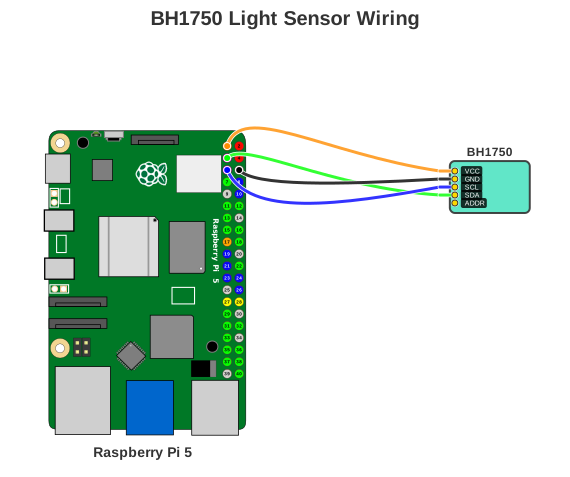
# Generate a BH1750 light sensor wiring diagram
pinviz example bh1750 -o bh1750.svg

# See all available examples
pinviz list
Create a YAML configuration file (my-diagram.yaml):
title: "BH1750 Light Sensor Wiring"
board: "raspberry_pi_5"

devices:
  - type: "bh1750"
    name: "BH1750"
    color: "turquoise"  # Named color support (or use hex: "#50E3C2")

connections:
  - board_pin: 1     # 3V3
    device: "BH1750"
    device_pin: "VCC"

  - board_pin: 6     # GND
    device: "BH1750"
    device_pin: "GND"

  - board_pin: 5     # GPIO3 (I2C SCL)
    device: "BH1750"
    device_pin: "SCL"

  - board_pin: 3     # GPIO2 (I2C SDA)
    device: "BH1750"
    device_pin: "SDA"
Generate your diagram:
pinviz render my-diagram.yaml -o output.svgfrom pinviz import boards, devices, Connection, Diagram, SVGRenderer
board = boards.raspberry_pi_5()
sensor = devices.bh1750_light_sensor()
connections = [
Connection(1, "BH1750", "VCC"), # 3V3 to VCC
Connection(6, "BH1750", "GND"), # GND to GND
Connection(5, "BH1750", "SCL"), # GPIO3/SCL to SCL
Connection(3, "BH1750", "SDA"), # GPIO2/SDA to SDA
]
diagram = Diagram(
title="BH1750 Light Sensor",
board=board,
devices=[sensor],
connections=connections
)
renderer = SVGRenderer()
renderer.render(diagram, "output.svg")PinViz provides a modern CLI
# Generate diagram from YAML config
pinviz render examples/bh1750.yaml -o output.svg# Validate diagram configuration
pinviz validate examples/bh1750.yaml# List all boards, devices, and examples
pinviz listPinViz includes an MCP (Model Context Protocol) server that enables natural language diagram generation through AI assistants like Claude Desktop. Generate diagrams with prompts like "Connect a BME280 temperature sensor to my Raspberry Pi 5" with intelligent pin assignment, automatic I2C bus sharing, and conflict detection.
Full documentation: nordstad.github.io/PinViz
- Installation Guide - Detailed installation instructions
- Quick Start Tutorial - Step-by-step getting started guide
- CLI Usage - Command-line interface reference
- YAML Configuration - Complete YAML configuration guide
- Python API - Programmatic API reference
- Examples Gallery - More example diagrams and configurations
- API Reference - Complete API documentation
Contributions are welcome! Please see our Contributing Guide for details.
Adding new devices: See guides/adding-devices.md for device configuration details.
MIT License - See LICENSE file for details
Board and GPIO pin SVG assets courtesy of Wikimedia Commons
Even Nordstad
- GitHub: @nordstad
- Project: PinViz
- Documentation: nordstad.github.io/PinViz