"What if your computer actually knew you?"

  ██╗  ██╗ █████╗ ███╗   ██╗ █████╗      ██████╗ ███████╗
  ╚██╗██╔╝██╔══██╗████╗  ██║██╔══██╗    ██╔═══██╗██╔════╝
   ╚███╔╝ ███████║██╔██╗ ██║███████║    ██║   ██║███████╗
   ██╔██╗ ██╔══██║██║╚██╗██║██╔══██║    ██║   ██║╚════██║
  ██╔╝ ██╗██║  ██║██║ ╚████║██║  ██║    ╚██████╔╝███████║
  ╚═╝  ╚═╝╚═╝  ╚═╝╚═╝  ╚═══╝╚═╝  ╚═╝     ╚═════╝ ╚══════╝
                                             P R O M E T H E U S
Glad you asked. XANA OS is a self-hosted intelligence dashboard that lives entirely on your machine. No subscriptions. No cloud. No one watching your queries. Just you, a terminal, and a system that quietly becomes more useful the longer you use it.
It started as a side project. It turned into something that's kind of hard to describe without sounding unhinged. So here's the honest pitch:
XANA OS watches the sky (literally — real aircraft and satellites), listens to the internet, knows your conversation history better than you do, and talks back. It's part command center, part personal AI, part OSINT workstation. It runs on a potato if needed.
What's inside:
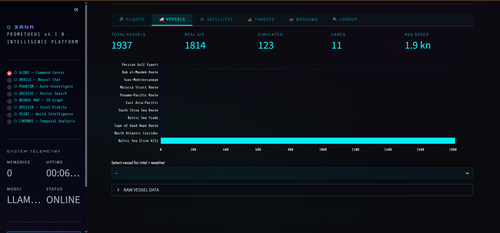
- 🌍 Live 3D Globe — real aircraft transponders (OpenSky), vessel positions (AIS), satellite tracks (CelesTrak), all rendered on a pydeck globe in your browser
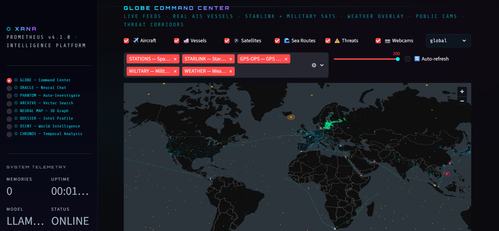
- 🧠 AI Chat with Memory — conversational AI that actually remembers your past conversations via ChromaDB vector search. Not a gimmick. It retrieves relevant chunks at query time and injects them as context. Your data never moves.
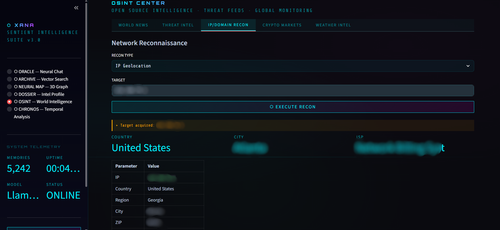
- 🕵️ OSINT Center — world news, known exploited vulnerabilities (CISA KEV), IP/domain recon, crypto markets, weather. All free. No keys needed.
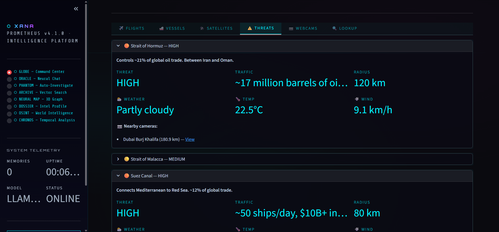
- 👻 PHANTOM Protocol — autonomous multi-source entity investigation. Give it a target. Walk away. Come back to a briefing.
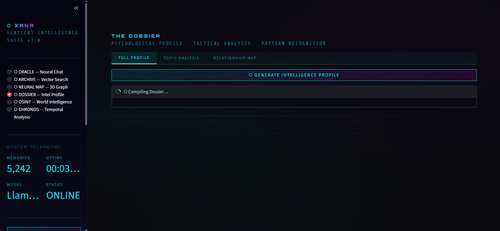
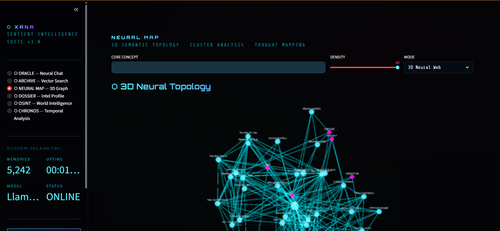
- 🗺️ Neural Map — 3D semantic topology of your entire conversation history. Equal parts useful and unsettling.
All data sources are free and require zero API keys (except optional Windy webcams, which are also free).
| What | How |
|---|---|
| Web framework | Streamlit |
| LLM (runs locally) | Ollama — llama3.2 or whatever model you prefer |
| Vector memory | ChromaDB + all-MiniLM-L6-v2 sentence embeddings |
| 3D globe | pydeck |
| Charts | Plotly |
| Graph analysis | NetworkX |
| Satellite tracking | CelesTrak TLE + Keplerian orbital propagation |
No cloud inference. No telemetry. No subscription tier where features disappear.
git clone https://github.com/sriharideveloper/xanaops.git
cd xana-os
./setup.sh        # creates virtualenv, installs deps, checks Ollama
./start.sh        # launches the app
Open http://localhost:8501 and you're in.
What works immediately (no setup): GLOBE, OSINT, all live-feed modules. What needs your data first: ORACLE, ARCHIVE, NEURAL MAP, DOSSIER, CHRONOS — these are the memory-linked modules. See Step 4 to build your brain.
- Python 3.10+ — you probably have this
- Ollama — local LLM runtime from ollama.com. Takes two minutes to install.
# Pull a model — the default
ollama pull llama3.2

# Or go smaller (less RAM), or bigger (better answers):
# ollama pull qwen2.5:0.5b   ← potato mode
# ollama pull mistral         ← solid all-rounder
# ollama pull deepseek-r1:8b  ← reasoning tasks
Change the active model in config.py whenever you want.
git clone https://github.com/YOUR_USERNAME/xana-os.git
cd xana-os./setup.sh # one-time: creates venv, installs everything
./start.sh # start XANA OSWindows or manual setup:
python -m venv xana_env
xana_env\Scripts\activate        # Windows
# source xana_env/bin/activate   # Linux/macOS
pip install -r requirements.txt
streamlit run app.py
First launch downloads the
all-MiniLM-L6-v2embedding model (~90 MB). Get a coffee.
This is optional, but it's why XANA OS exists. The memory system ingests your ChatGPT conversation history, embeds it into a vector database, and gives the AI instant semantic search over everything you've ever discussed with a language model.
Think of it as giving your AI a long-term memory it was never supposed to have.
From ChatGPT:
- Settings → Data Controls → Export Data
- Download and extract the ZIP
- Drop all
conversations-*.jsonfiles into the project root
python legacy/parse_chats.pyReads your conversations-N.json files → produces master_chats.csv. Adjust the file count in the last line of parse_chats.py if you have more than a few.
python legacy/1_prep_data.pyTakes each user message + AI response and pairs them into semantic blocks → paired_chats.csv. These become your memory units.
python legacy/build-brain.pyEmbeds everything using all-MiniLM-L6-v2 and writes it to xana_memory_db/. Grab another coffee. CPU-only is fine — this runs once.
./start.shORACLE, ARCHIVE, NEURAL MAP, DOSSIER, and CHRONOS are now operational. They will now quietly know things about you that you've forgotten.
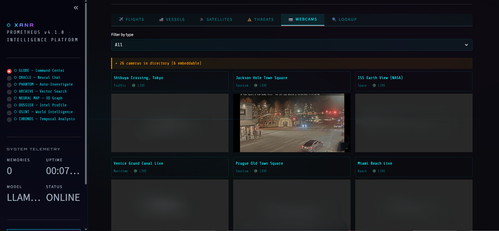
Live webcam feeds from anywhere in the world. Free key at api.windy.com.
export WINDY_API_KEY=your_key_here
./start.sh
Or in .streamlit/secrets.toml:
WINDY_API_KEY = "your_key_here"XANA needs no fine-tuning. No model training. No ML degree.
The approach is deceptively simple: instead of teaching the model your data, it retrieves the most relevant chunks from your history at query time and injects them directly into the prompt. The model reasons over context it was handed — not weights it was baked with.
Your question
     │
     ▼
ChromaDB Vector Search  ──►  top N semantically similar memory chunks
     │
     ▼
[System prompt] + [Memory chunks] + [Recent chat history] + [Your question]
     │
     ▼
Local LLM via Ollama  ──►  a grounded, specific, actually-useful answer
Why this is better than you'd expect:
- Works with any Ollama model — swap in
config.py, no rebuild needed - Your data never touches an external server
- No GPU required for training — inference only
- Feed it any ChatGPT export without reformatting
Edit config.py. That's it. No YAML archaeology.
| Setting | Default | What it does |
|---|---|---|
LLM_MODEL |
llama3.2 |
Ollama model name |
DB_PATH |
./xana_memory_db |
Where ChromaDB lives |
COLLECTION_NAME |
xana_memories |
ChromaDB collection |
EMBEDDING_MODEL |
all-MiniLM-L6-v2 |
Sentence transformer model |
GLOBE_DEFAULT_SAT_GROUPS |
stations, starlink, gps, military, weather | Default satellite layers on globe |
AGENT_SAFE_COMMANDS |
see config.py | Shell commands ORACLE can execute |
Switching models is literally one line:
LLM_MODEL = "mistral" # doneXANA runs on anything. Here's how to tune it to your hardware without guessing.
| What | Where | Default | Effect |
|---|---|---|---|
| LLM model | config.py → LLM_MODEL |
llama3.2 |
Speed vs. answer quality |
| Embedding model | config.py → EMBEDDING_MODEL |
all-MiniLM-L6-v2 |
Search quality vs. build speed |
| Memory depth | app.py ~line 907 → n=5 |
5 |
How many memory chunks retrieved |
| Context window | modules/database.py ~line 80 → max_chars=4000 |
4000 |
Characters of memory fed to LLM |
| Chat history | app.py ~line 929 → messages[-4:] |
4 |
How many prior turns stay in context |
Keep it lean. Keep it alive.
config.py:
LLM_MODEL       = "llama3.2:1b"        # or "qwen2.5:0.5b"
EMBEDDING_MODEL = "all-MiniLM-L6-v2"   # already lightweight, keep it
app.py (~line 907):
docs, metas, _ = query_memories(collection, prompt, n=3)app.py (~line 929):
for msg in st.session_state.messages[-2:]:modules/database.py (~line 80):
def build_context_string(docs, metas, max_chars=1500):You're already here. The defaults are tuned for you. Nothing to change.
LLM_MODEL       = "llama3.2"
EMBEDDING_MODEL = "all-MiniLM-L6-v2"
# n=5 · messages[-4:] · max_chars=4000Push everything up. You earned it.
config.py:
LLM_MODEL       = "llama3.1:8b"           # or mistral, qwen2.5:14b, deepseek-r1:8b
EMBEDDING_MODEL = "all-mpnet-base-v2"      # higher quality, slower DB build (worth it)
app.py (~line 907):
docs, metas, _ = query_memories(collection, prompt, n=10)app.py (~line 929):
for msg in st.session_state.messages[-8:]:modules/database.py (~line 80):
def build_context_string(docs, metas, max_chars=8000):| Tier | Model | n= |
History | max_chars |
|---|---|---|---|---|
| 🥔 Potato | llama3.2:1b |
3 | 2 turns | 1500 |
| ⚡ Mid-range | llama3.2 |
5 | 4 turns | 4000 |
| 🔥 Beast | llama3.1:8b+ |
10 | 8 turns | 8000 |
Tip: The embedding model only affects DB build time and search quality — not response speed. You can always rebuild with a better embedding model by deleting
xana_memory_db/and re-runningbuild-brain.py.
| Module | What it does | Needs DB? |
|---|---|---|
| GLOBE | 3D live globe — aircraft, vessels, satellites, threat overlays, webcams | No |
| ORACLE | Memory-linked AI chat with agentic commands | Yes |
| PHANTOM | Autonomous multi-source investigation protocol | Yes |
| ARCHIVE | Raw semantic vector search over your memory | Yes |
| NEURAL MAP | 3D semantic topology — visualize your conversation history as a landscape | Yes |
| DOSSIER | AI-generated intelligence profile compiled from your memory | Yes |
| OSINT | News, cyber threats, IP/domain recon, crypto prices, weather | No |
| CHRONOS | Temporal pattern analysis — find out what you used to care about | Yes |
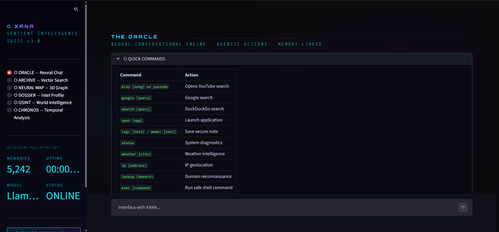
Type these directly in the chat interface:
| Command | What happens |
|---|---|
play [song] on youtube |
Opens YouTube search |
google [query] |
Opens Google search |
open [app] |
Launches an application |
weather [city] |
Fetches current weather |
ip [address] |
IP geolocation lookup |
lookup [domain] |
Domain recon sweep |
phantom [target] |
Full PHANTOM investigation |
recon [target] |
Quick recon sweep |
exec [command] |
Safe shell execution (see config for allowed commands) |
status |
System diagnostics |
Everything below is free. Nothing requires an API key.
| Source | What it provides |
|---|---|
| OpenSky Network | Live aircraft transponder positions |
| Finnish Digitraffic AIS | Real vessel positions (Baltic Sea + global) |
| CelesTrak | Satellite TLE orbital elements |
| CARTO | Dark map tiles |
| Google News RSS | World news headlines |
| CISA KEV | Known exploited vulnerabilities feed |
| ip-api.com | IP geolocation |
| CoinGecko | Cryptocurrency market data |
| Open-Meteo | Weather forecasts |
| GDELT | Geopolitical event database |
| Script | Purpose |
|---|---|
setup.sh |
One-time setup — creates venv, installs deps, checks Ollama |
start.sh |
Launch XANA OS |
Memory pipeline (legacy/):
| Script | Purpose |
|---|---|
parse_chats.py |
Extracts messages + timestamps from ChatGPT JSON exports |
1_prep_data.py |
Pairs user/AI messages into semantic blocks |
build-brain.py |
Embeds everything into ChromaDB |
XANA OS runs entirely on your machine.
The only external network calls are read-only requests to the public data sources listed above. No personal data is transmitted in any of them.
Your conversation history, memory database, and LLM inference all stay on-device. Ollama runs locally. ChromaDB is a folder on your disk. There is no analytics, no telemetry, no phoning home.
What you put into XANA stays in XANA.
MIT — see LICENSE for the legal version of "do whatever you want."
ALL SYSTEMS NOMINAL
XANA OS · PROMETHEUS · v∞
Built for people who think their tools should be smarter than their cloud subscriptions.