
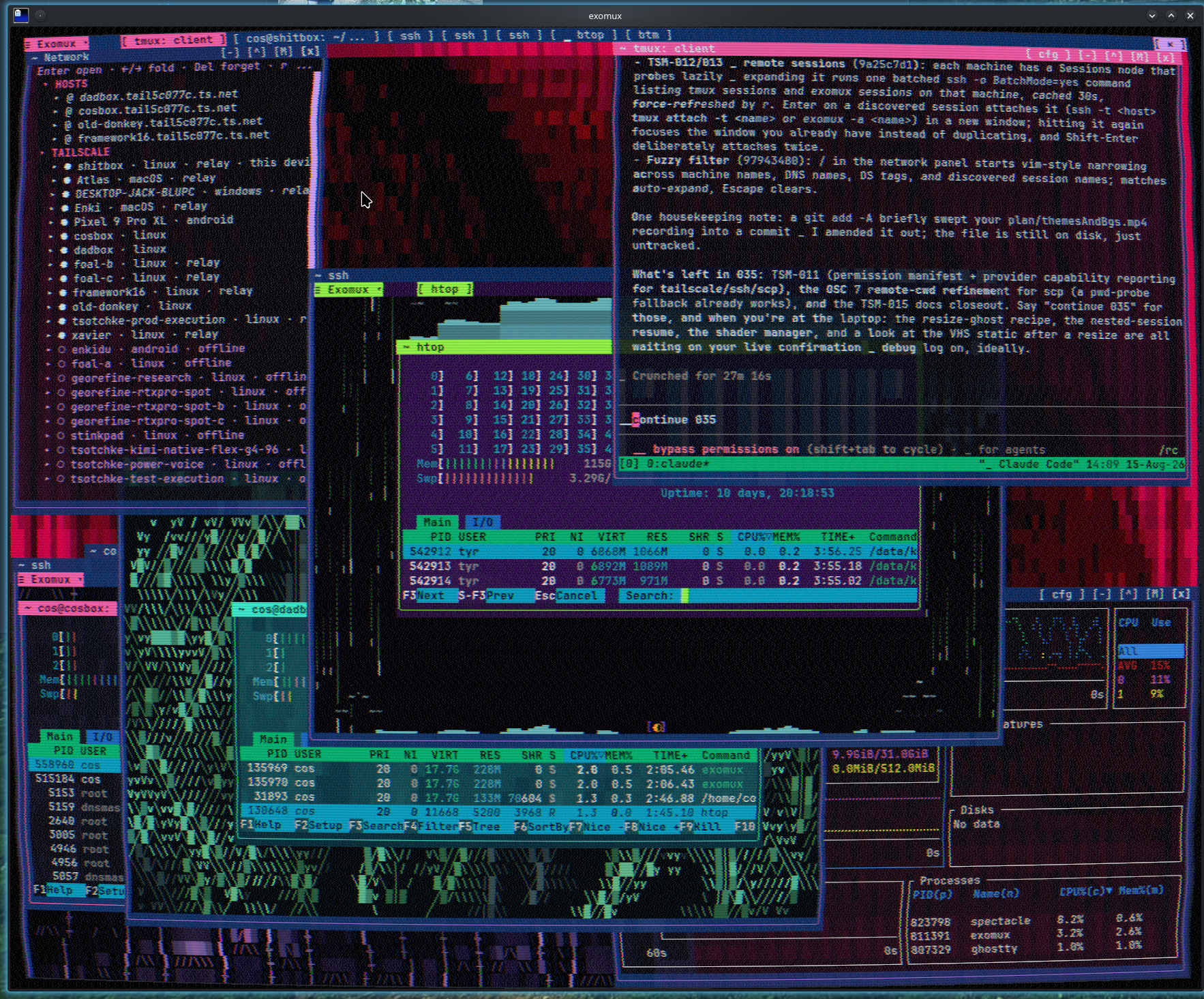
themes-and-backgrounds.mp4
exotui-demo.mp4
— that screenshot is a real terminal: draggable transparent windows compositing through each other, a fluid-simulated desktop behind them, remote machines one keystroke away, and a VHS shader over the lot.
exotui is a reactive, batteries-included toolkit for building serious terminal applications in Deno — from a
ten-line form to a full desktop environment. It ships as one package with focused entrypoints (published to JSR as
@ubernaut/exotui): a signal-driven core, a retained-mode cell canvas, forty-plus widgets with headless controllers, an
application runtime, terminal emulation good enough to build a terminal inside your terminal, browser and remote
hosts, and an optional Three.js ASCII renderer.
exomux is its flagship — a terminal multiplexer that grew into a terminal desktop. Shells live in a detachable
daemon that outlives the UI (tmux's model), but the client is a windowing environment: floating, snapping, transparent
windows over animated backgrounds, a network panel that reaches your whole tailnet, a MilkDrop audio visualizer, and
Ghostty shader integration. Exomux imports only the public entrypoints — nothing in it touches src/ — so it doubles as
the standing proof that the published API is sufficient for a production-shaped application. Every gap it hit became a
library export.
- A real desktop, in cells. Windows drag, resize, snap, tile, maximize, and minimize over a live animated desktop. Transparency is honest compositing: a translucent window blends against every window and background layer beneath it, not just the wallpaper.
- Backgrounds that are alive. Fourteen theme-derived fields — a rain background running a 2-D fluid simulation (the desktop floods; the drain plug is clickable), ivy that grows fruit, circuits, fire, matrix rain — and a butterchurn visualizer driving a 472-preset MilkDrop catalog off your microphone, with both WebGPU and CPU renderers — the GPU pipeline is validated against real butterchurn frame-by-frame, and 468 of the 472 presets hold a live picture in the auto-cycle rotation.
- The terminal is the GPU. Under Ghostty, exomux manages real display shaders: CRT scanlines, barrel distortion (with cursor-quantized pointer warping — the cell the cursor shows is exactly the cell a click acts on), and a five-artifact VHS effect — plus a manager window for chaining your own GLSL files. Every shader parameter tunes in 2.5% steps.
- Your network is a tree. Saved SSH hosts and live Tailscale devices in one panel: open a shell, launch a remote
system monitor, ping, copy addresses to the OS clipboard, discover tmux/exomux sessions on other machines and attach
with focus-if-open semantics, all fuzzy-filterable. Paste a local file path onto a remote shell and it offers to
scpit to that shell's working directory. - Engineered like it matters. The write path survives saturated ptys and self-heals truncated frames; multiple clients attached to one session stay in live sync; resumed full-screen apps are asked to repaint themselves; a debug mode captures every warning, error, and flush-telemetry line to a log file. The exomux package alone carries 440 tests.
- Deno developers who want a typed, reactive, dependency-light way to build terminal UIs — with a tested path from "one button" to "application shell with routes, commands, themes, and undo history".
- tmux/screen users who want a multiplexer with windows instead of panes — and are willing to have fun.
- Tool builders who need the middle layers à la carte: headless widget controllers, terminal emulation, scrollback, process/PTY sessions, layout solvers, or the testing harness, each importable on its own.
- Creative coders — ASCII Three.js scenes, audio-reactive MilkDrop visuals, shader-warped terminals, and a cell canvas that treats the terminal as a render target.
The toolkit
- Reactive state:
Signal,Computed,Effect, lazy variants, persistent signals. - Retained-mode canvas with diff-blitting ANSI output, styled text, and write-integrity self-healing on saturated/non-blocking terminals.
- Eight component families (foundation, input, navigation, data, feedback, overlays, dashboard, visualization) — every interactive widget backed by a headless controller usable without mounting anything.
createTerminalApp(): commands, key bindings, focus traversal, mouse routing, routes, settings, undo/redo history, plugins, and clean shutdown in one definition.- Layout: grids, flex, split panes, a window-manager controller, and an HTML/CSS-style markup tree with terminal-cell
media queries; CSS Grid with
minmax(),fit-content(),auto-fill/auto-fit, named lines, and dense placement; logical RTL edges; and optional Yoga and Taffy (WASM) backends. - Terminal emulation: process and PTY sessions, screen and scrollback controllers, OSC services (titles, OSC 52 clipboard, notifications, color queries), structured Kitty keyboard input (press/repeat/release with base-layout shortcut matching), a renderer-neutral screen-mode policy (alternate, buffered main-screen, split-footer), and conservative capability detection (truecolor, synchronized updates, Kitty/Sixel graphics, multiplexer identity) — enough to host full-screen apps inside your app.
- Themes as semantic tokens with packs, pipelines, and validation; a Markdown component with a renderer-neutral document model.
- Code and data surfaces: a worker-backed streaming syntax service with a reusable code view, unified and split diff views with gutters, a full text-area (wrap modes, selection-edge auto-scroll, editing aliases), and tree-grid, JSON/YAML inspector, and hex-viewer controllers.
- Built-in devtools: a live layout inspector, filtered console, key diagnostics, hot-reload error surface, a diagnostics hub (invalidation reasons, frame and cell-diff stats, cache behavior, leak warnings), and renderer idle/live accounting with a reusable debug overlay.
- Accessibility as data: a semantic tree with an honest ARIA projection, ARIA APG pattern test suites, high-contrast and color-blind-safe palettes, and reduced-motion contracts.
- Performance discipline: seed-deterministic layout benchmarks with cold/warm separation, CI-gated comparison reports, and budgets derived from real terminal, worker, and browser baselines.
- Browser (
./web) and remote-terminal (./remote) entrypoints that reuse the same controllers and projections. - Three.js ASCII renderer (
./three-ascii) with WebGPU post-processing, glyph/block/mixed output, and adaptive budgets. - A headless testing harness: in-memory terminal, interaction pilot, and snapshot helpers — the same tools this repository's own suites run on.
Exomux
- Detachable loopback daemon (token-authenticated WebSocket); named sessions tmux-style (
-ncreate,-aattach,--list-sessions); crash-safe relaunch over stale or wedged descriptors. - PTY-backed shells via the optional
@sigma/pty-ffiadapter with a pipe fallback. - Floating window workbench: drag, resize, snap, tile, shelf, taskbar, per-window settings, session rename, responsive settings layout on narrow terminals.
- Phone-aware layout: below 50 columns the desktop hands the whole screen to one window at a time — terminals and the sessions, network, and settings panels alike — so a session resumed on a phone never comes back off screen. Widening the terminal restores the floating desktop; the "Mobile layout" setting forces it on or off.
- Per-desktop and per-window opacity with true multi-layer compositing; chrome and controls blend at half the window's transparency.
- Fifteen themes and fourteen animated backgrounds, cycled from the settings window or prefix
b; organic backgrounds slowly overgrow idle windows and retreat when you focus them. - Butterchurn audio visualizer: 472 real MilkDrop presets (equations and shaders), GPU and CPU renderers, mic-driven, with a preset browser and favorites; the GPU pipeline is validated against real butterchurn and keeps 468 of the 472 presets in the auto-cycle rotation.
- Ghostty shader management: CRT scanlines, pincushion (pointer-warped), VHS with five independent artifact intensities, and a shader-manager window for enabling, reordering, and adding custom GLSL entries; shader changes apply live to every attached client, pointer warp included.
- Network panel: remembered SSH hosts plus live Tailscale devices; per-machine actions (shell, system monitor, ping, OSC
52 address copies); lazy remote tmux/exomux session discovery with attach and focus-if-open;
/fuzzy filter. - Paste-to-scp: dropping a local file path on a remote shell offers a confirmed
scpinto that shell's captured working directory. - Multi-client: every attached client sees window opens/closes live; the sessions panel lists all host sessions and switches between them in place.
- Global debug logging (console tees, uncaught errors, write-path flush telemetry) behind a settings toggle.
Run it straight from JSR, where it is published as @ubernaut/exomux:
deno run -A --unstable-webgpu jsr:@ubernaut/exomux/mainOr build on it — exomux is a package as well as an application, so another application can import its controller, protocol and widgets the same way it imports the library:
import { createExomuxController } from "jsr:@ubernaut/exomux";Or download a binary for your platform from Releases and run it — nothing else to install:
chmod +x exomux-linux-x86_64 && ./exomux-linux-x86_64From a checkout, or to build it yourself:
deno task exomux            # or: ./visualization exomux
./install-exomux.sh         # compile + install ~/.local/bin/exomux for use from anywhere
Ctrl-N is the prefix key; Ctrl-N ? lists every command.
It is a real package rather than an example: packages/exomux carries its own deno.json, its own deno.lock, and 440
tests, and it reaches the toolkit only through the public entrypoints listed below.
deno task exomux:test       # the package suite
deno task exomux:compile    # a self-contained binary
Exomux's detached host currently requires Linux or Windows; see OS Support. It runs on macOS, but the daemon cannot detach there, so a session ends with the client.
The repository is a Nix flake: every launcher wraps the matching deno task, pins the runtime, and keeps module
downloads in a per-user cache (~/.cache/exotui-deno), so nothing else needs to be installed.
nix run github:ubernaut/exotui                    # exomux, the default app
nix run github:ubernaut/exotui#orbital-command    # or glyph-forge, inkstone
nix run github:ubernaut/exotui#glyph-forge-fonts  # install the figlet corpus for glyph-forge
nix profile install github:ubernaut/exotui#exomux # keep exomux on PATH
nix develop                                       # dev shell with deno and tmux
From a checkout the same commands take . instead of the GitHub reference (nix run .#glyph-forge).
The library is published on JSR as @ubernaut/exotui:
deno add jsr:@ubernaut/exotui          # the root entrypoint
deno add jsr:@ubernaut/exotui/app      # what new applications want
Or import it directly, without adding it to an import map:
import { createTerminalApp } from "jsr:@ubernaut/exotui/app";Every entrypoint in the table below is importable the same way.
New applications should use the focused ./app entrypoint:
import { crayon } from "https://deno.land/x/crayon@3.3.3/mod.ts";
import { Button, Computed, createTerminalApp, Signal } from "jsr:@ubernaut/exotui/app";

const count = new Signal(0);
const app = createTerminalApp<{ type: "increment" }>({
  tuiOptions: { style: crayon.bgBlack },
  commands: [{
    id: "increment",
    label: "Increment",
    binding: { key: "return" },
    action: { type: "increment" },
  }],
  onAction: () => count.value += 1,
  setup(app) {
    const button = new Button({
      parent: app.tui,
      rectangle: new Computed(() => ({
        column: Math.max(1, Math.floor(app.tui.rectangle.value.width / 2) - 9),
        row: Math.max(1, Math.floor(app.tui.rectangle.value.height / 2) - 1),
        height: 3,
        width: 18,
      })),
      label: { text: new Computed(() => `Count: ${count.value}`) },
      theme: {
        base: crayon.bgBlue,
        focused: crayon.bgLightBlue,
        active: crayon.bgCyan,
      },
      zIndex: 1,
      onPress: () => void app.executeCommand("increment"),
    });
    app.registerComponent(button);
    app.focus.focus(button);
  },
});

app.start();
TerminalApp owns input, command bindings, focus traversal, mouse routing, bracketed paste, terminal signals, and
cleanup by default. Every binding can be disabled for embedding or tests. From a repository checkout, run the focused
example, component demo, or launcher:
deno task terminal-app
deno task demo
./visualizationjsr:@ubernaut/exotui/viz draws data in a terminal. The idea it is built on is that what to draw is a measurement,
not a lookup: you describe the shape of your data, and the registry ranks the visualizations that suit it at the size
you have.
A reading is described by two facts — how many dimensions it has, and whether you keep its past:
| Kind | A reading is | For example |
|---|---|---|
0d |
one number | CPU load right now |
0dt |
one number, over time | CPU load for the last minute |
1d |
an array | an audio spectrum right now |
1dt |
an array, over time | per-core load for the last minute |
2d |
a grid | left and right spectra together |
2dt |
a grid, over time | that pair, kept |
3d |
a stack of grids | a density volume, or a field of vectors |
A stream declares the kind it carries and a visualization declares the kinds it draws. Pairing them wrongly throws
rather than drawing something quietly false. History can be dropped — a 0dt stream will feed a renderer that wants
0d, which is handed the latest reading — but never invented, and rank never converts.
import { scalarStream, vectorStream } from "jsr:@ubernaut/exotui/viz";

const load = scalarStream({ capacity: 240, domain: { min: 0, max: 1 }, label: "cpu" });
const cores = vectorStream({ capacity: 240, domain: { min: 0, max: 1 }, label: "cores" });

load.push(0.42, Date.now());
cores.push([0.4, 0.9, 0.2, 0.6], Date.now());This is the part worth understanding. A visualization declares an absolute minimum size, what one entry of data costs it, and how many entries it needs before it is the thing it claims to be. Scoring those against your actual data answers a question a table of breakpoints cannot: eighty-eight cores drawn as bars want eighty-eight columns, and four cores want four.
import { fitVisualizations } from "jsr:@ubernaut/exotui/viz";

fitVisualizations({ kind: "1dt", extent: [4] }, { width: 60, height: 16 });
// overlay:1.05  psychograph:1.00  bars:0.80  hexgrid:0.75  waterfall:0.67  rack:0.60  scope:0.42

fitVisualizations({ kind: "1dt", extent: [88] }, { width: 60, height: 16 });
// overlay:1.05  scope:0.85  waterfall:0.76  hexgrid:0.75  bars:0.61  rack:0.23
Each result carries a score, a crowding and a reason in words — "fits comfortably",
"88 entries are tight here", "only 2 to show — wants 6". The reason is meant to be shown to a person: it is how a
settings page explains its own choice instead of presenting it as a preference.
crowding is reported separately from score because they answer different questions. The score ranks candidates
against each other; crowding says whether the winner is worth drawing at all. Sixteen cores in one row can rank first
and still be nonsense — which is how a very small terminal ends up showing labelled numbers, with no special case
written for it.
A visualization renders a VizFrame — rows of cells, each with its own colour. VisualizationView puts one on screen,
splitting each row into runs of identically styled cells so a chart costs a handful of components per row rather than
one per column.
import { Signal } from "jsr:@ubernaut/exotui";
import { bestVisualization, drawStream, resolveVisualizationTheme, VisualizationView } from "jsr:@ubernaut/exotui/viz";

const theme = resolveVisualizationTheme(myThemeTokens); // any sparse token map
const rectangle = new Signal({ column: 2, row: 2, width: 60, height: 12 });
const view = new VisualizationView({
  parent: tui,
  rectangle,
  styleFor: (run) => createAnsiStyle({ foreground: run.foreground, background: run.background }),
});

const chart = bestVisualization({ kind: "1dt", extent: [cores.latest()!.length] }, rectangle.peek())!;
view.present(drawStream(chart, cores, { size: rectangle.peek(), theme }));
Colours come from a viz:* token group that falls back through the chrome and status tiers, so a theme that never heard
of charts still paints them.
planTiles divides an area into tiles and picks each one's visualization. Give it sources — an id, the shape of that
source's data, and optionally the visualization that suits its subject — and it returns the layout plus whatever it
had no room for.
import { planTiles } from "jsr:@ubernaut/exotui/viz";

const layout = planTiles({ column: 0, row: 1, width, height: height - 2 }, [
  { id: "cpu", shape: { kind: "0dt" } },
  { id: "cores", shape: { kind: "1dt", extent: [navigator.hardwareConcurrency] } },
  { id: "spectrum", shape: { kind: "1dt", extent: [28] }, prefer: "scope" },
], { overrides: pinnedByTheUser });

for (const tile of layout.tiles) {
  // tile.rect, tile.chart, tile.framed, tile.visualization, tile.fits
}
The order it resolves in is: a visualization the user pinned, then the source's own prefer, then whatever ranked
highest on shape alone. A pin that stops fitting is ignored rather than obeyed.
drawTileFrame and drawTileLabel draw the chrome — a rounded border with its title and reading set into the top row,
or a single labelled line for a tile too small for a border. drawValueAxis, drawTimeAxis and drawLegend label a
chart; measure the gutter with valueAxisWidth first, because nothing in that layer shrinks the chart it labels.
| Kind | Visualizations |
|---|---|
0d |
readout, meter, dial, odometer |
0dt |
sparkline, strip, area, psychograph |
1d |
bars, rack, scope, hexgrid, status-grid |
1dt |
waterfall, lattice, overlay, psychograph |
2d |
heatmap, scatter, surface, ring-volume, overlay |
3d |
volume-projection, point-cloud, vector-field |
overlay is the btop-style chart: one braille trace per series, each in its own colour. psychograph draws the same
data with a pip per series at cell resolution — colour alone fails a monochrome terminal, and a braille cell holds eight
dots but only one colour, so the two make opposite trades and both are ranked.
The projected views (surface, point-cloud, ring-volume, vector-field) are arithmetic, not Three.js: the core has
no runtime dependencies and a wireframe chart should not add one.
jsr:@ubernaut/exotui/viz/three is the other path — retained geometry rendered by the ASCII pipeline, which costs a
dependency on three and buys shading, depth and post-processing a wireframe cannot reach. Importing it is the choice
to pay for that.
A scene is deliberately not a Visualization. That contract is render(data) => frame, synchronous cells; a scene is
retained geometry rendered on its own schedule. So it builds once, updates when the data changes, and disposes when the
tile goes away:
import { ThreeAscii } from "jsr:@ubernaut/exotui/three-ascii";
import { fitDataScenes, surfaceScene } from "jsr:@ubernaut/exotui/viz/three";

const instance = surfaceScene.create({ theme });
new ThreeAscii({ parent: tui, rectangle, scene: instance.scene, camera: instance.camera });

// whenever a reading arrives
instance.update(matrix, { theme, domain: { min: 0, max: 1 } });
three-surface draws a matrix as a height field, three-lattice a volume as a cloud of points, three-rings a matrix
as a stack of rings. They carry the same fitness vocabulary as the cell renderers, so fitDataScenes ranks them on the
same scale — concatenate the two lists and a caller with a box and some data gets one answer rather than two.
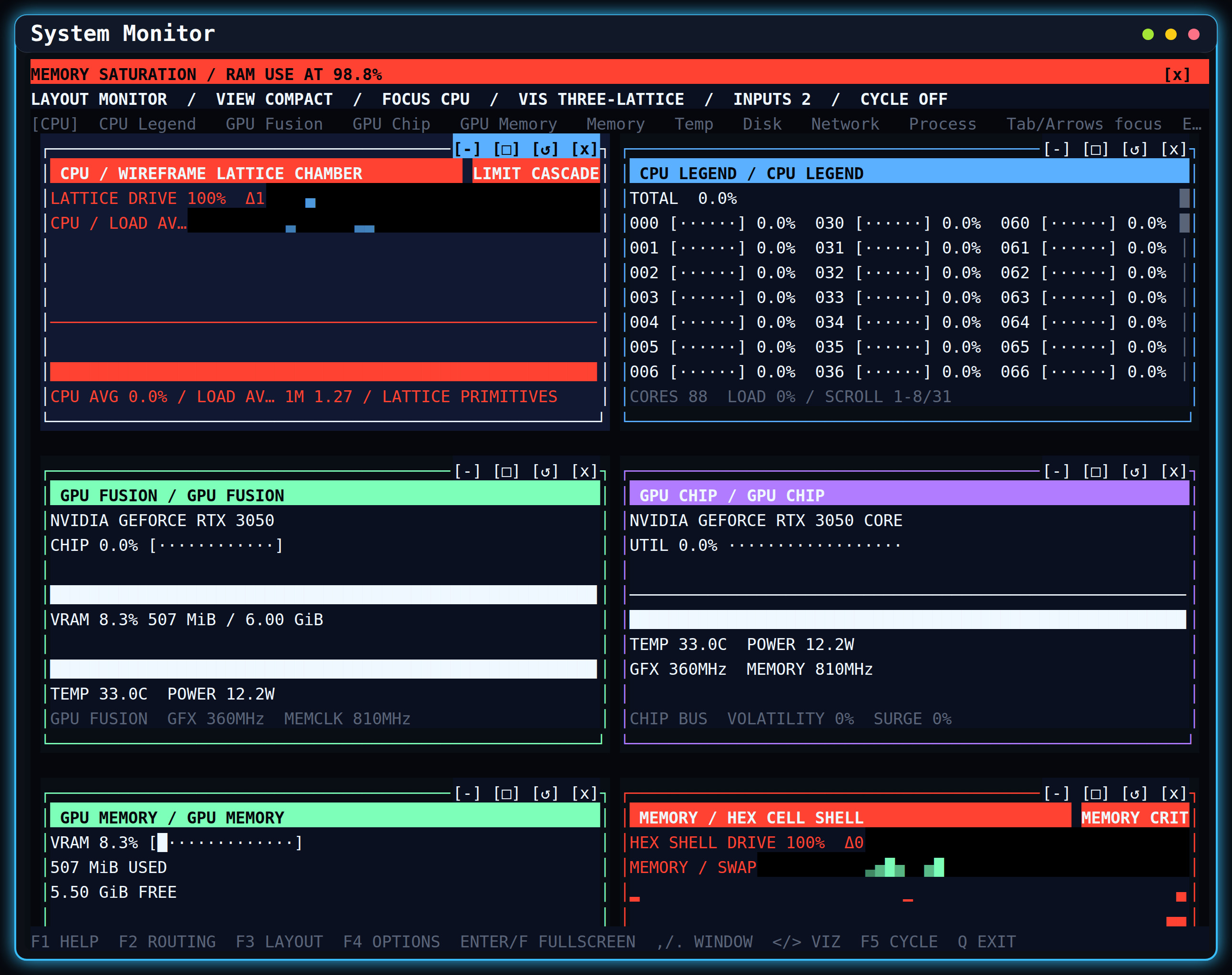
examples/showcases/exomonitor/ is a system monitor built on all of the above, and the reason most of it exists — real
data of several shapes, arriving at different rates, on a terminal whose size nobody controls.
deno task exomonitor                       # run it
deno task exomonitor:preview 120x36        # print a screen at any size, without resizing a terminal
deno task exomonitor:preview 18x4          # including sizes nobody can resize to
Worth reading in order:
| File | What it shows |
|---|---|
feeds.ts |
describing your data: one entry per way of reading a source, with its kind |
tiles.ts |
handing live entry counts to planTiles — the whole adapter is forty lines |
compose.ts |
composing a screen of charts and chrome into one frame |
settings.ts |
offering the alternatives fits reported, with the registry's own reason for each |
view.ts |
mounting: one VisualizationView for the screen, a second for anything live |
Two things it demonstrates that are easy to miss. Everything except view.ts is pure and tested without a terminal
— if a chart needs a mounted frame to test, the model is in the wrong place. And a feed can declare itself live:
audio analyses at 60 Hz and its tile is redrawn by its own data on a second view above the screen, so sixty frames a
second costs one chart rather than the whole terminal.
| Area | Primary ownership |
|---|---|
| Terminal foundation | src/tui.ts, src/canvas/, src/component.ts, src/view.ts |
| Input and interaction | src/input_reader/, src/input.ts, src/focus.ts, src/keymap.ts, src/selection.ts |
| Widgets and controllers | src/components/ |
| Layout and markup | src/layout/, src/markup/ |
| App architecture | src/app/ |
| Runtime and concurrency | src/runtime/ |
| Theme system | src/theme*.ts |
| Three.js ASCII renderer | src/three_ascii/ |
| Flagship application | packages/exomux/ (standalone package, own config and lockfile) |
| Full-screen applications | app/ |
| Focused examples and tooling | examples/, scripts/ |
The package is intentionally layered. Core terminal APIs remain Deno-first. Three.js, Yoga, browser build tooling, and screenshot tooling stay behind their owning entrypoints or tasks.
The export map in deno.jsonc defines the supported package boundaries:
| Import target | Source | Runtime | Stability |
|---|---|---|---|
. |
mod.ts |
terminal | stable |
./app |
mod.app.ts |
terminal | beta |
./web |
mod.web.ts |
browser | beta |
./shell |
mod.shell.ts |
shared | beta |
./remote |
mod.remote.ts |
remote | experimental |
./three-ascii |
mod.three_ascii.ts |
shared | experimental |
./showcase |
src/showcase/mod.ts |
shared | beta |
./viz |
src/viz/mod.ts |
shared | beta |
./viz/three |
src/viz/three/mod.ts |
shared | experimental |
./theme |
mod.theme.ts |
shared | beta |
./runtime |
mod.runtime.ts |
shared | beta |
./terminal |
mod.terminal.ts |
terminal | beta |
./testing |
mod.testing.ts |
terminal | beta |
./layout/yoga |
src/layout/solvers/yoga.ts |
shared | experimental |
./layout/taffy |
src/layout/taffy.ts |
shared | experimental |
./layout/taffy-wasm |
src/layout/solvers/taffy_wasm.ts |
shared | experimental |
Use ./showcase when you are building an application on this library the way exomux and the demo showcases are: it
carries the kernel, manifests, providers, sessions and terminal store they share, so an application does not have to
reinvent its own shell.
Use ./app for new terminal applications and the root entrypoint for compatibility or low-level composition. Focused
entrypoints let application and tooling authors avoid taking a dependency on the broad terminal surface. Package
stability policy and release checks are documented in
API Stability and Packaging.
- Exomux documents the flagship multiplexer, why it is packaged separately, and how it depends on the toolkit.
- Repository Overview maps module families, integration surfaces, demos, and quality gates.
- API Reference is generated from the public re-export graph and lists every exported symbol.
- API Stability and Packaging defines entrypoint tiers and release policy.
- Testing and Performance covers test helpers, benchmarks, probes, and contributor gates.
- Visualization App documents the system monitor shell and visualization controls.
- HTML/CSS-Style Layout documents markup parsing, the supported CSS subset, and the simple and optional Yoga solvers.
- Terminal Emulation Strategy describes process, PTY, screen, and scrollback scope.
- Curses and WebTUI Parity records terminal and browser toolkit expectations.
- Browser Framework Plan explains the browser host, DOM target, remote bridge, and Pages build direction.
Use the generated and queryable catalogs instead of maintaining parallel symbol lists:
deno task api-inventory
deno task component-catalog
deno task app-plugin-catalog
deno task benchmark -- --list
./visualization --listThe main design rule is separation between state, projection, and host rendering:
Signal,Computed,Effect, and their lazy variants own reactive state propagation.Canvas, draw objects, and sinks own terminal-cell rendering and repaint behavior.- Widget controllers own reusable interaction state; components own terminal presentation.
- Command adapters expose controller operations to menus, palettes, keymaps, and plugins.
TuiAppcomposes actions, routes, commands, focus, settings, history, and disposable plugins.- Runtime plans select workers, storage, renderers, and terminal capabilities outside deterministic components.
- Terminal and browser workbenches share renderer-neutral controller, geometry, menu, workspace, and projection code.
| Family | Representative APIs |
|---|---|
| Foundation | Box, Frame, Label, Text, View |
| Input | Button, CheckBox, ComboBox, Input, TextBox, RadioGroup, Slider |
| Navigation | List, VirtualList, Tabs, MenuBar, Tree, FileExplorer, Breadcrumbs, Stepper |
| Data and text | Table, DataTableController, Pad, ScrollArea, LogViewer, TextAreaController, CodeViewController, TreeGridController, HexViewerController |
| Feedback | ProgressBar, Spinner, EmptyState, StatusBar, ToastStack |
| Overlays | Modal, ContextMenu, CommandPalette, KeyHelp |
| Dashboard | Sparkline, Gauge, Chart, MetricSeriesController |
| Visualization | ThreeAscii, system monitor panels, Neon Three scenes |
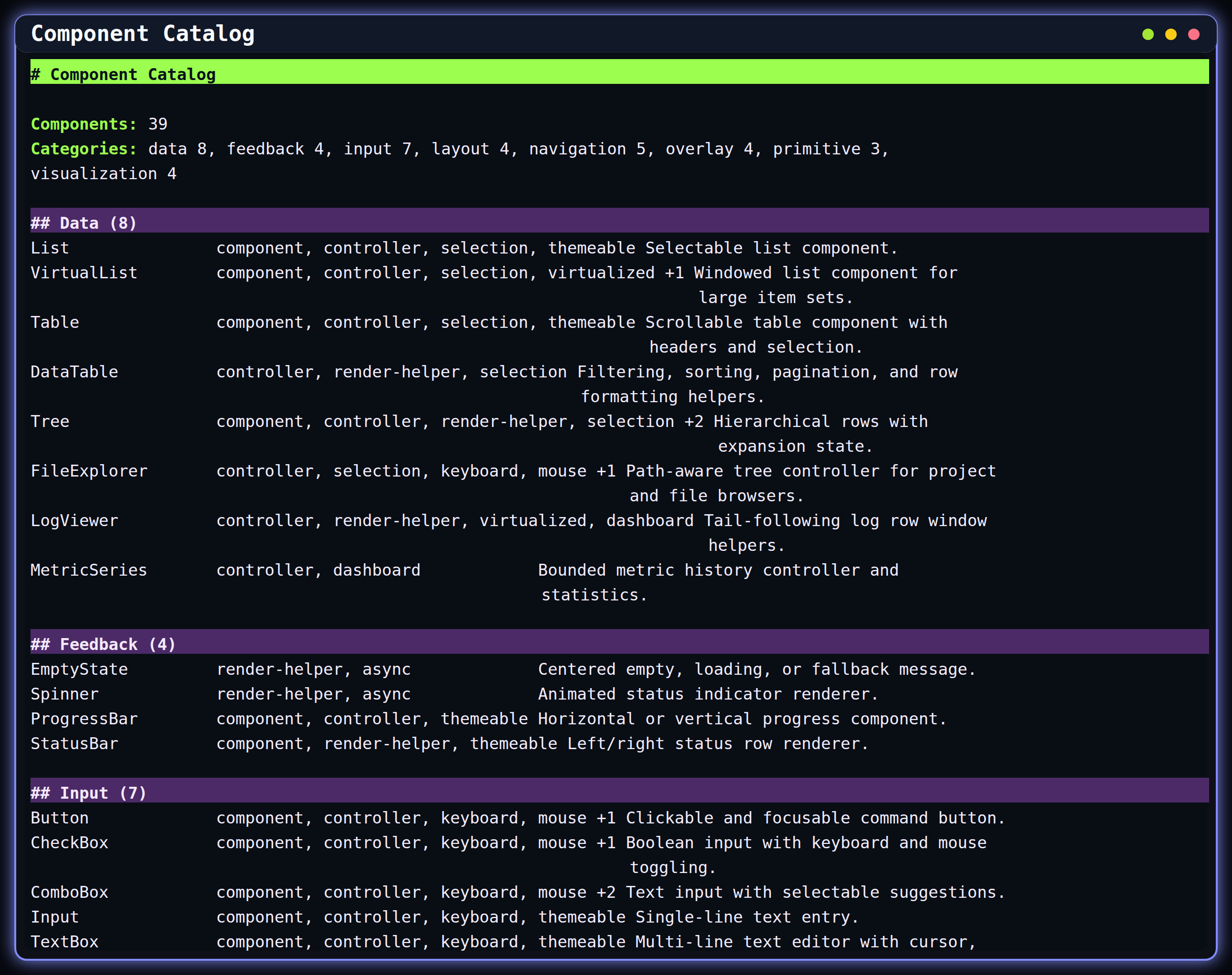
deno task component-catalog is the authoritative component inventory. It supports text and JSON output and includes
category, capability, controller, and Three.js metadata.
The beta ./app entrypoint also includes Markdown and MarkdownController. A pinned markdown-it parser produces a
renderer-neutral document model; the terminal projection adds cell-width wrapping, nested lists and quotes, task items,
fenced code, links, rules, tables, semantic ANSI styling, scrolling, and responsive reflow. parseMarkdown() and
renderMarkdown() can be used without mounting the component.
import { Markdown } from "jsr:@ubernaut/exotui/app";

const document = new Markdown({
  parent: app.tui,
  rectangle: { column: 0, row: 0, width: 80, height: 24 },
  zIndex: 1,
  theme: { base: crayon.white, focused: crayon.white },
  source: "# Status\n\n- [x] Runtime ready\n- [ ] Deploy",
});
app.registerComponent(document);
Controllers can be used without mounting a component. Their command adapters preserve the same behavior across command palettes, menus, key bindings, and tests:
import { bindSliderCommands, CommandRegistry, type SliderCommandAction, SliderController } from "./mod.ts";

const slider = new SliderController({
  min: 0,
  max: 100,
  step: 5,
  value: 40,
  orientation: "horizontal",
});

const commands = new CommandRegistry<SliderCommandAction>();
const dispose = bindSliderCommands(commands, slider, {
  id: "volume",
  idPrefix: "settings.volume",
  includeValueCommands: true,
  values: [0, 50, 100],
});

await commands.execute("settings.volume.increment", console.log);
dispose();
slider.dispose();GridLayout, HorizontalLayout, and VerticalLayout cover declarative terminal grids. flexRects(), split panes,
responsive recipes, and WindowManagerController support application shells and tiled workspaces. The markup path adds
an HTML/CSS-style tree with terminal-cell media queries, Flexbox, a broad CSS Grid subset (minmax(), fit-content(),
auto-fill/auto-fit repetition, named lines, template areas, dense placement, content-based tracks), logical RTL
edges, absolute positioning, overflow inspection, and optional Yoga and experimental Taffy (WASM) backends.
See HTML/CSS-Style Layout,
examples/layout_recipe_report.ts, examples/html_css_layout.ts, and examples/window_manager_demo.ts for executable
examples.
createApp() assembles the terminal host with an ActionBus, RouteManager, CommandRegistry, focus manager, keymap,
and lifecycle disposal. Settings bindings, undo/redo history, command surfaces, and plugin helpers build on those owners
instead of introducing app-local state loops.
createTerminalApp() is the recommended application boundary. It accepts routes, commands, key bindings, focus items,
mouse targets, plugins, middleware, action handling, and component setup in one definition, then owns the standard
terminal interaction and shutdown wiring. registerComponent() connects an interactive component to app focus and
pointer routing without legacy global control handlers.
The runtime layer provides capability and terminal plans, AsyncScheduler, WorkerPool, RenderLoop, memory and
IndexedDB stores, persistent signals, async resources, cached pipelines, data queries, process sessions, PTY backend
selection, and workload telemetry. Optional capabilities are selected through explicit plans and diagnostics so
components remain deterministic.
Start with these focused examples:
| Workflow | Example or task |
|---|---|
| App routes, settings, commands, themes | deno task app-shell |
| Forms and widget bindings | deno task form-workflow |
| Data table sorting and selection | deno task table-selection |
| Process and terminal commands | deno task terminal-command |
| Worker pool and scheduler telemetry | deno task runtime-workloads |
| Cached resources and pipelines | deno task cached-resource, deno task cached-pipeline |
| Runtime and terminal capability report | deno task capabilities |
Themes use semantic tokens and component states rather than hard-coded demo colors. Palette presets, theme packs,
provider layers, engine factories, pipelines, resolver caches, gallery previews, validation, and binding groups are
available through the root or ./theme entrypoint.
Run deno task theme-gallery for the built-in palette suite and deno task theme-workspace for the combined provider,
factory, pipeline, and prewarm workflow.
mod.web.ts exposes the Canvas2D browser host, input source, ANSI cell parsing, DOM rendering helpers, and shared app
surfaces without constructing the terminal runtime. mod.remote.ts exposes the transport-neutral remote terminal
protocol, browser client, and bridge to a TerminalSessionHandle.
Validate these boundaries with:
deno task web:check
deno task web:demo:check
deno task web:test
deno task remote:checkThe optional Three.js renderer projects scenes into terminal cells using block, glyph, or mixed output. It supports WebGPU-backed post-processing, edge and fill controls, depth color and fog, deferred readback, adaptive panel budgets, and browser-compatible scene composition. Renderer and panel sizes follow their current terminal-cell rectangle, so console resize updates propagate through camera aspect, render targets, and visible grid projection.
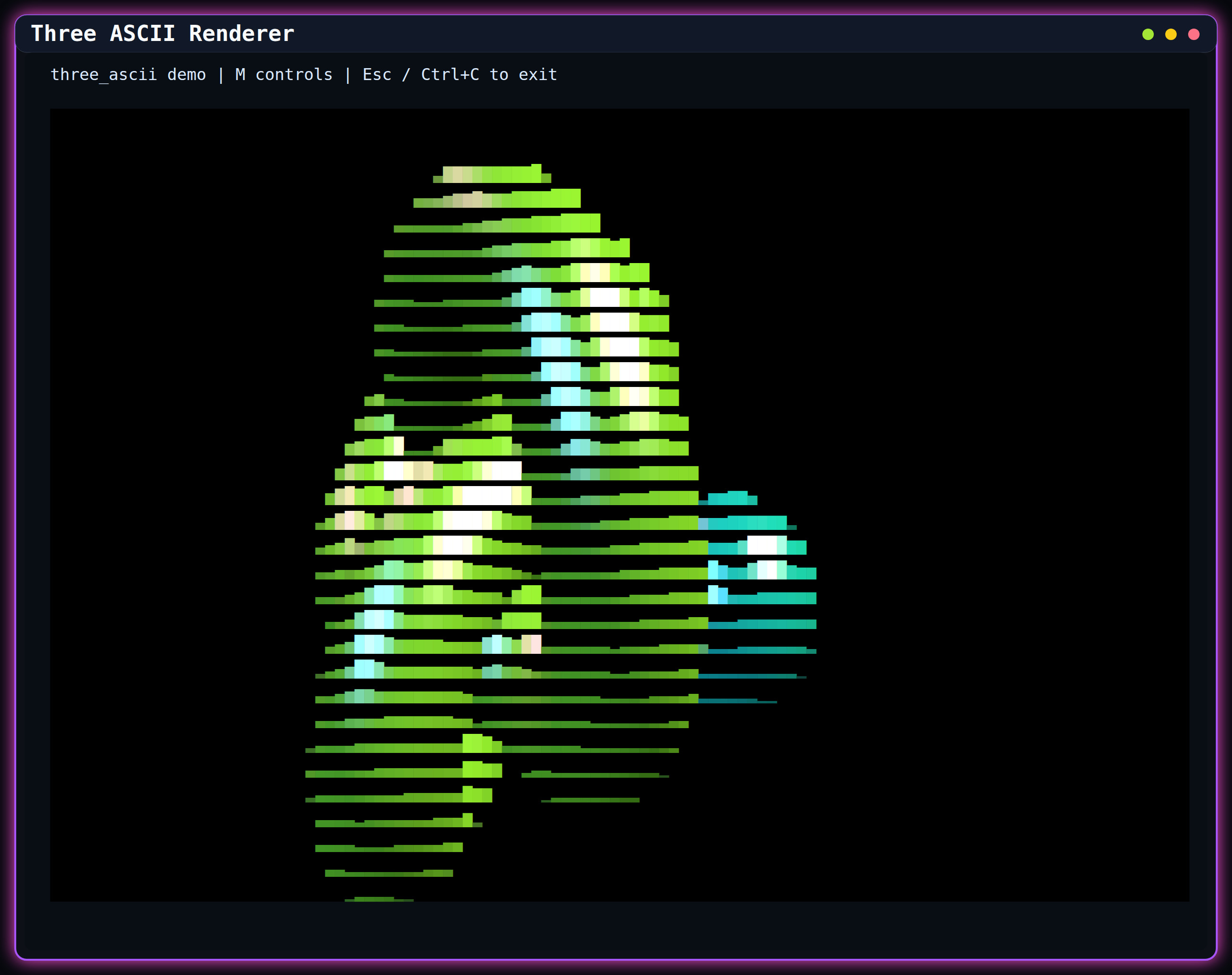
Run the standalone renderer with:
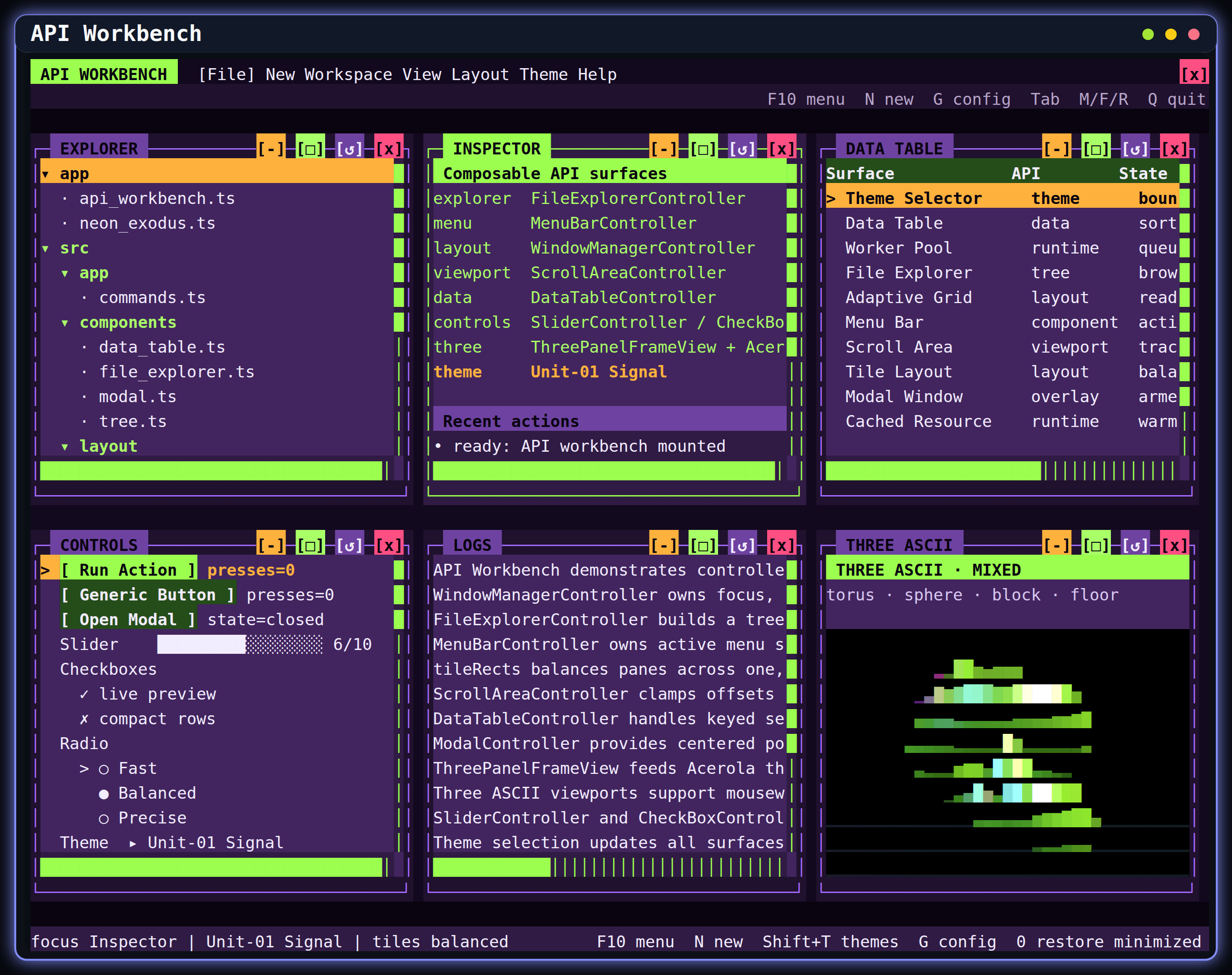
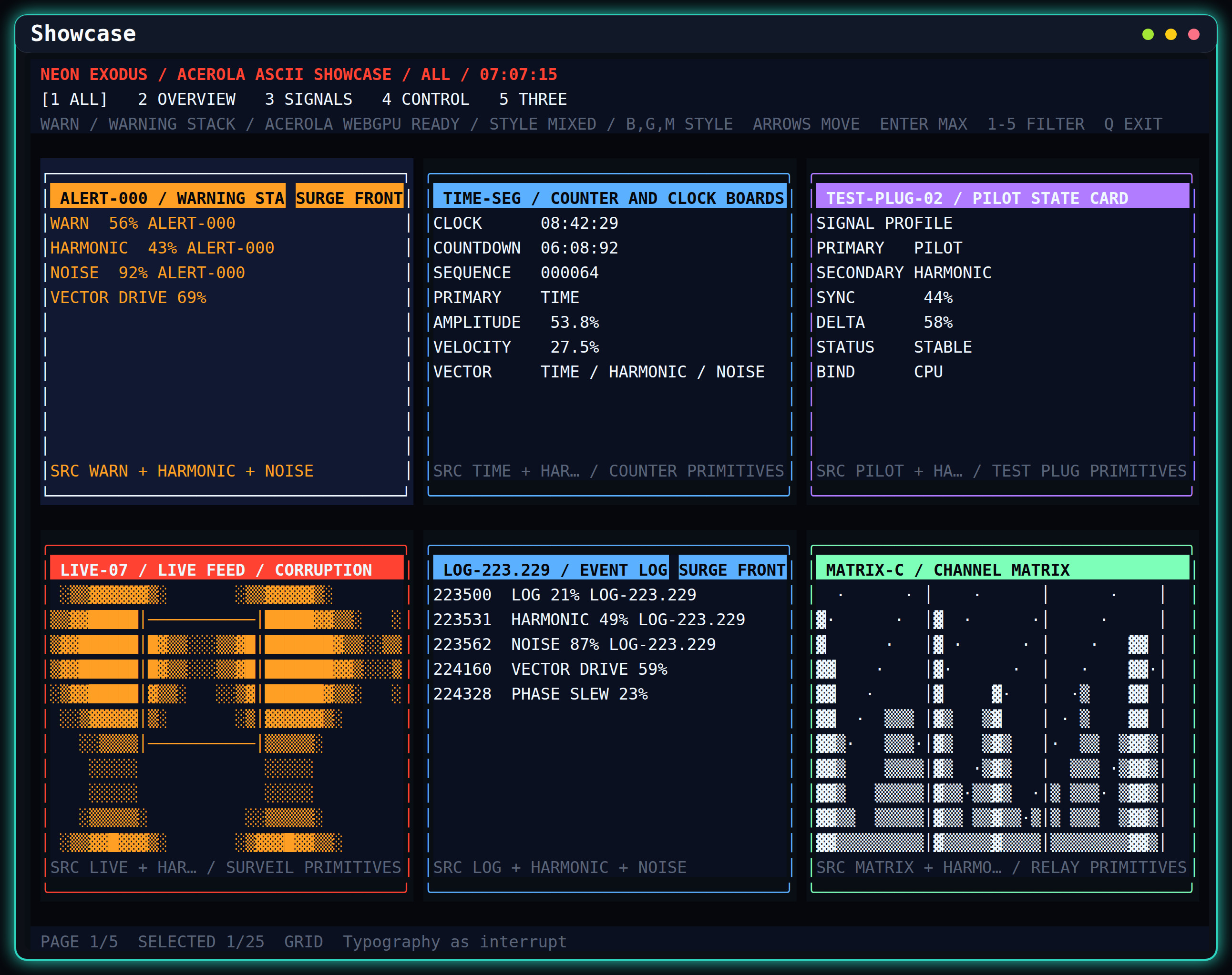
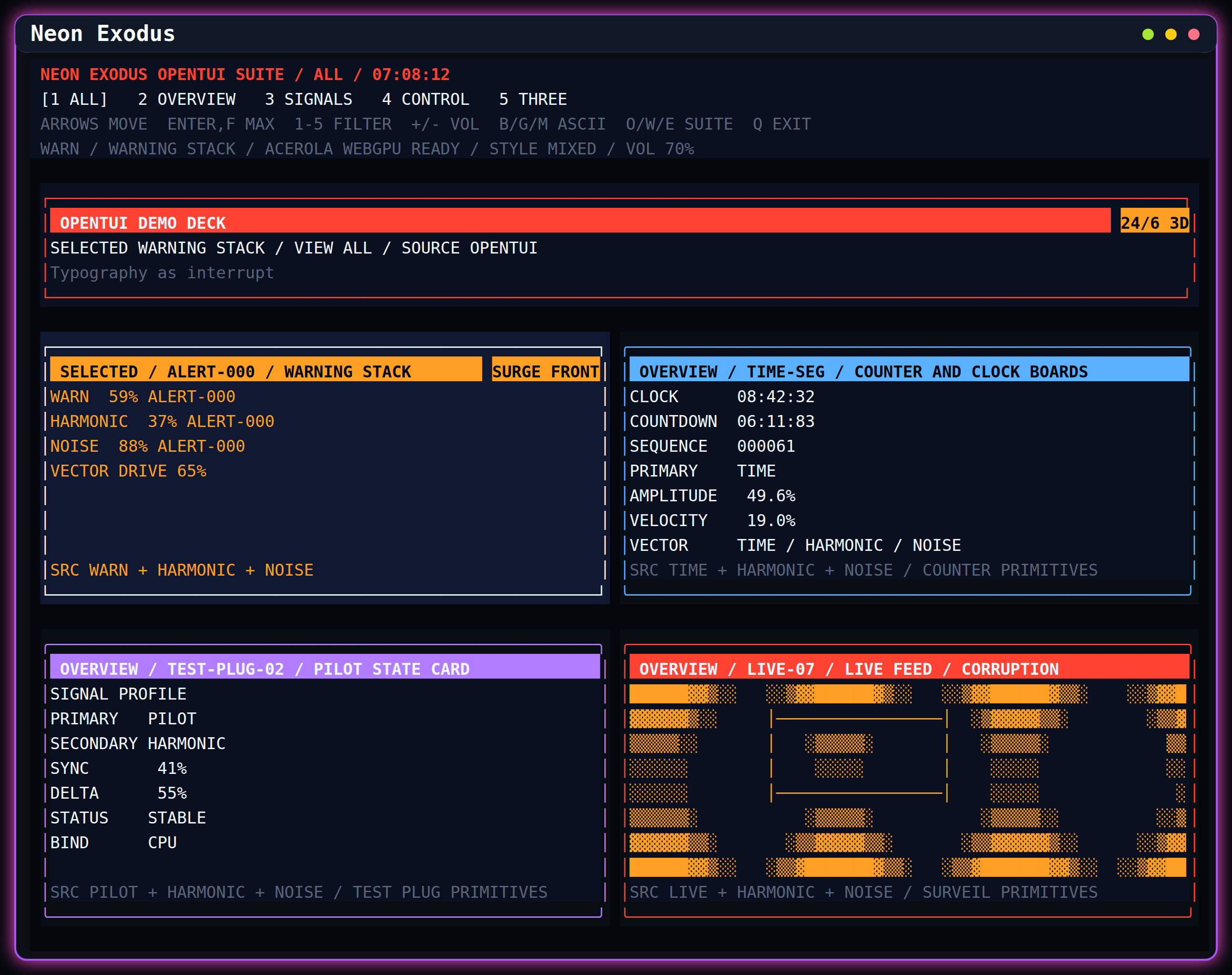
deno task three-asciiThe API Workbench and Neon applications exercise the renderer inside resizable, tiled, fullscreen, and minimized windows. GPU-backed probes and visual smokes are documented in Testing and Performance.
./visualization is the canonical launcher. It supports interactive search, direct aliases, and a machine-readable
catalog. Common entrypoints are:
| Command | Surface |
|---|---|
./visualization exomux |
Terminal multiplexer with a detachable host — the flagship application |
./visualization portfolio |
API Workbench with managed windows, controls, terminal panes, and Three.js |
./visualization showcase |
Expanded widget and visualization showcase |
./visualization neon |
Neon Exodus-compatible and extended demo decks |
./visualization monitor |
Live system monitor dashboard |
./visualization polygons |
Standalone Three.js ASCII geometry scene |
./visualization workspace-launcher |
File-explorer-driven managed demo workspace |
./visualization gallery |
Compact capability report |
./visualization health |
Contributor health gate |
Use ./visualization --list for every current alias and description. Use deno task with no task name to inspect all
direct Deno tasks from deno.jsonc.
Four application-scale showcases under examples/showcases/ prove the toolkit at product depth. Each runs from a plain
deno task (add :persistent to keep state across launches) or from the Nix flake:
| Command | Application |
|---|---|
deno task orbital-command |
3D orbital observatory and mission console |
deno task glyph-forge |
Cell-art studio with layers, frames, and a figlet text tool |
deno task inkstone |
Markdown notes editor with command palette and find/replace |
deno task exomonitor |
System monitor, and the worked example for ./viz |
Orbital Command renders a real Three.js scene — Earth, deterministic starfield, Kepler-propagated orbits — through the ASCII pipeline, with simulation-time controls, live telemetry, and terminal-cell raycast picking: clicking a satellite marker selects it, and the catalog list, telemetry panel, and gold selection emphasis stay linked. Without WebGPU it falls back to an honest top-down text map.
GlyphForge paints styled cells with atomic undo per gesture, and its text tool stamps FIGlet lettering in any font from
the patorjk corpus: deno task glyph-forge:fonts installs over 400 fonts, and b opens a searchable font browser with
a live preview.
These fixed-size terminal captures are regenerated with deno task screenshots. The checked-in set is intentionally
limited to distinct interactive or catalog surfaces.
The full contributor gate is:
deno task healthIt verifies formatting, public API and package policy, generated docs, examples, browser and remote entrypoints, benchmarks, the main test matrix, the Exomux package suite, browser tests, and worker tests. Useful focused commands include:
deno test
deno task exomux:test
deno task package-check
deno task api-inventory -- --check
deno task benchmark
deno task e2e
Exomux resolves against its own config, so a bare deno test at the repository root does not reach it — run
deno task exomux:test (or deno task health, which includes it) when changing anything it depends on.
Renderer and workbench changes also require the matching live probe or PTY/browser visual smoke. See Testing and Performance for the current matrix and thresholds.
| Operating system | Linux | macOS | Windows* | WSL |
|---|---|---|---|---|
| Base | yes | yes | yes | yes |
| Keyboard support | yes | yes | yes | yes |
| Mouse support | yes | yes | yes | yes |
| Exomux detached host | yes | no | yes | yes |
On Windows, run chcp 65001 if Unicode characters display incorrectly.
Exomux's detached host needs to place its daemon in its own session. On Linux that uses setsid, which must be present
as a regular file at /usr/bin/setsid or /bin/setsid; on Windows detaching the standard handles is sufficient. macOS
has no equivalent path yet, so the host reports daemon-detach-unavailable there. Everything else in Exomux — the
workbench, backgrounds, and protocol — is platform-neutral.
Open an issue or pull request for bug fixes, features, or documentation improvements. Keep changes scoped, add focused coverage for behavior changes, and run the relevant health gates before submitting.
This project follows Conventional Commits.
MIT. See LICENSE.md.